Archived Security
This page collects older security-related settings and instructions that are no longer part of the main Security configuration flow. Some of them may still apply to specific environments or legacy setups.
Interactive Logon
Windows 2008 and later security settings for Credential Provider
Two security settings are required for "Foreground execution":
- Do not require CTRL+ALT+DEL To make interactive logon work in Windows 2008 you must disable SAS (Secure Attention Sequence). You do this by opening Administrative tools->Local Security Policy.
In the Local policies you need to enable "Interactive logon: Do not require CTRL+ALT+DEL" as in the image below:
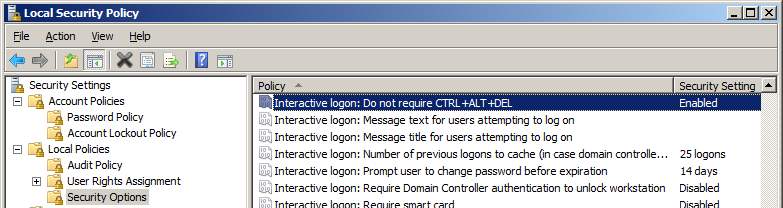

This security setting determines whether pressing CTRL+ALT+DEL is required before a user can log on.
If this policy is enabled on a computer, a user is not required to press CTRL+ALT+DEL to log on. Not having to press CTRL+ALT+DEL leaves users susceptible to attacks that attempt to intercept the users' passwords. Requiring CTRL+ALT+DEL before users log on ensures that users are communicating by means of a trusted path when entering their passwords.
If this policy is disabled, any user is required to press CTRL+ALT+DEL before logging on to Windows.
Default on domain-computers: Enabled: At least Windows 8/Disabled: Windows 7 or earlier. Default on stand-alone computers: Enabled.
- User Account Control: Admin Approval Mode for the Built-in Administrator account To be able to communicate with the Credential Provider you need to disable this setting found in Administrative tools->Local Security Policy->User Account Control: Use Admin Approval Mode for the built-in Administrator account. After applying this setting a reboot of the computer is required.
This policy setting controls the behavior of Admin Approval Mode for the built-in Administrator account.
The options are:
• Enabled: The built-in Administrator account uses Admin Approval Mode. By default, any operation that requires elevation of privilege will prompt the user to approve the operation.
• Disabled: (Default) The built-in Administrator account runs all applications with full administrative privilege.
