Client Events
Client events are pop-up messages that the Client shows in the lower right corner of the screen when something happens on a connected Server, for example when a Job starts, completes or fails, or when a Credential or Connection fails.
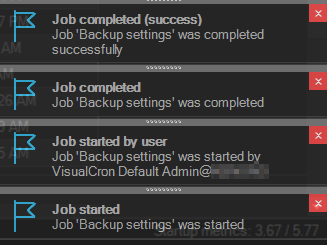
You choose which events pop up on the Client events tab of File -> Settings -> Client settings; see Settings - Client Settings. The event types cover:
- Jobs: started, started by user, paused, resumed, completed, completed with success or failure, and missed
- Tasks: Task error and Task missed
- Objects: a Credential, Connection, Notification, Condition set or SSH key that is not found or fails
- Triggers: inactivated or expired
- The Server and the Client: Server status changes, user logon, version mismatch, update checks and license messages
To see earlier events, click Events in the status bar, or click the button on a pop-up. The events window opens.