Versions
The Versions.. window lists the stored versions of one object, shows what changed between versions, and can revert the object to a selected version.
To open it, do one of the following:
- In the Audit log window, double-click a row, or right-click it and click Versions and details; see Objects - Audit Log
- Right-click a Job, Task or other object, such as a Connection or Credential, and click Versions..
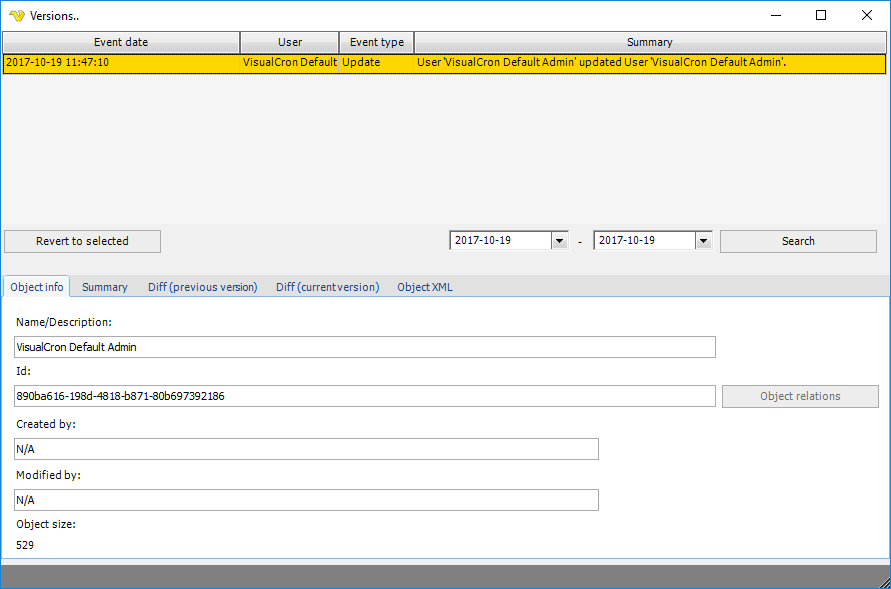
The upper part lists the stored versions with Event date, User, Event type and Summary. When the window opens, the date range is set to the period that holds versions of the object and the list is filled. To change the period, set the dates and click Search. How long versions are kept is set by the audit log settings in Settings - Log Settings.
Click a row to show the stored object in the tabs below.
Revert to selected
If the object exists, revert overwrites it with the selected version as soon as you confirm. A deleted object can be re-created only while its audit log entries are kept. Revert restores only the object itself, not the objects it refers to. For example, if a reverted Task uses a Credential that no longer exists, the Task may fail until you re-create the Credential and select it in the Task again.
- Click a row in the version list.
- Click Revert to selected, or right-click the row and click Revert to selected version.
- Click Yes in the Revert object confirmation.
The object is updated to the selected version, or re-created if it no longer exists. The revert is logged as an add or an update.
Object info tab
- Name/Description: the name of the object
- Id: the identifier of the object
- Created by and Modified by: who created and last changed the object, with the dates
- Object size: the size of the stored object
- Object relations: opens Objects - Object Relations for the object
Summary tab
The same text as the Summary column, easier to read when there are many changes.
Diff (previous version) tab
The property changes between the selected version and the version before it.
Diff (current version) tab
The property changes between the selected version and the object as it is now.
Object XML tab
The stored object as XML.