Objects - Object Replace/Merge
The main menu Tools > Objects > Object Replace/Merge option helps you to find a specific object and replace all uses of it with another object. If you need to update a specific Credential that is currently being used for multiple Jobs, you would select the old Credential as the source, then replace it with the newer one as the destination.
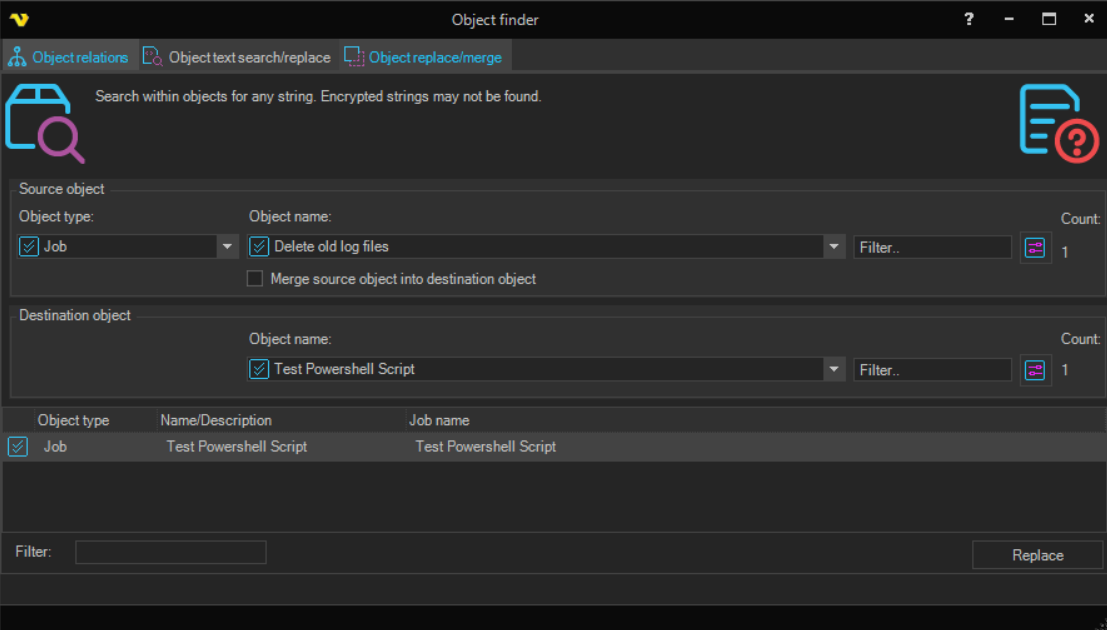
Source object
This is the object that is currently in use and that you want to replace.
- Object type - select the type of object to replace.
- Object name - select the specific object of that type. A Filter field is available to narrow down the list.
- Count - shows how many objects currently use the selected source object, which is the number of objects that will be affected by the replacement.
Merge source object into destination object
When this option is checked, the source object is merged into the destination object rather than only having its references replaced.
Destination object
This is the object that the source object will be replaced with.
- Object name - select the replacement object. A Filter field is available to narrow down the list. For some types (such as Connections) the list is limited to compatible objects.
- Count - shows how many objects currently use the destination object.
Result grid
The grid lists all objects that use the source object and that will be affected by the operation. The grid shows the Name/Description, Object type and Job name. You can double click on a row to open and edit that object, and use the Filter field below the grid to narrow the list.
Replace
Click Replace to perform the replace/merge operation. A summary is shown afterwards reporting how many objects were updated. The source and destination object must be different.