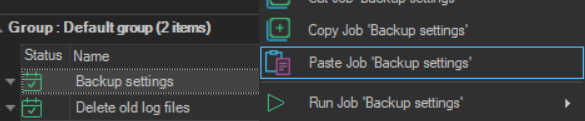
Paste Job
The Paste Job '<Job name>' item pastes a Job that was copied with Copy Job or cut with Cut Job.
warning
For a Job cut and pasted onto another Server, and for any cut Task, the original is deleted from the source Server even if you click Cancel, or if the copy could not be added to the target. See Cut Job.
- Right-click a Job in the target group, or the Server row of the target Server.
- Click
Paste Job '<Job name>'. - Click Ok in the confirmation.
You can also press Ctrl+V to paste.
The result depends on the target:
- The same Server: the Client asks to clone the Job. When you click Ok, a copy with new identifiers is added to the group you pasted into. The copy keeps the original name. This also happens for a cut Job, so a cut Job is not moved on the same Server
- Another Server: if the Job uses other objects, such as Connections or Credentials, a window lists them before the copy is made. Click Ok to add the Job to the target Server. For a cut Job, the original is then deleted from the source Server
Pasting a Job requires the Add permission for Jobs on the target Server.