Overview
The Job right-click menu in the Server/Group/Job/Task grid holds the actions for the selected Job and its Tasks. The toolbar above the grid has Add Job, Edit Job, Clone Job, Delete Job and Run Job, and Pause Job while a Job is running.

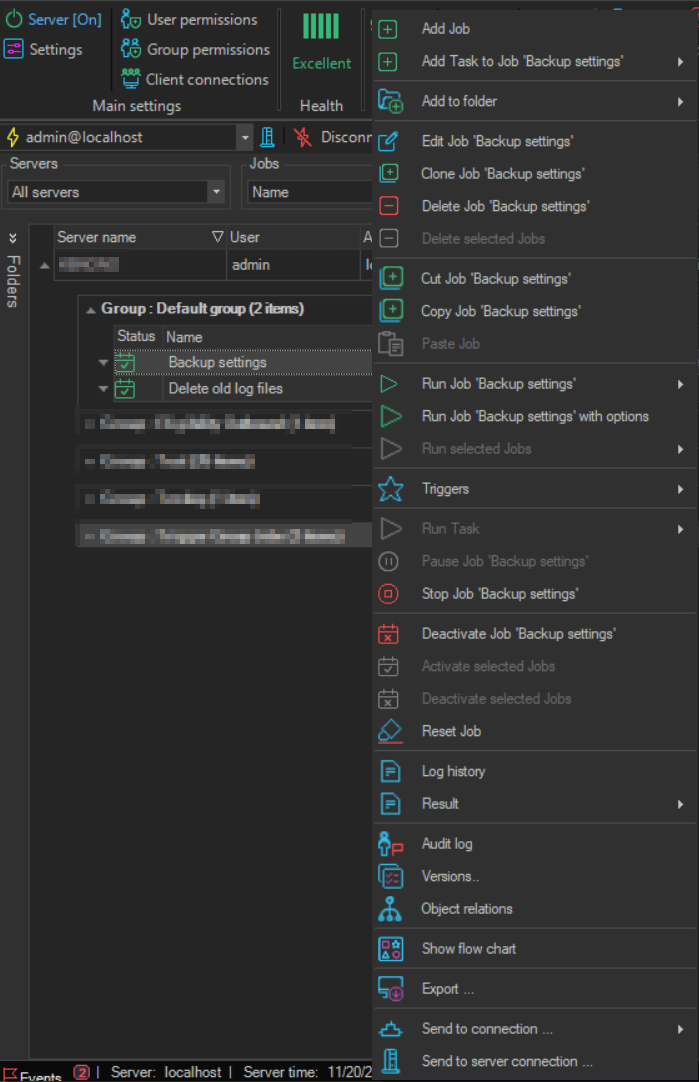
The menu has these items:
- Add Job: see Add Job
Add Task to Job '<Job name>': see Add Task to Job- Add to folder: see Job folders
Edit Job '<Job name>': see Edit JobClone Job '<Job name>': see Clone JobDelete Job '<Job name>': see Delete Job- Delete selected Jobs: see Delete Selected Jobs
Cut Job '<Job name>': see Cut JobCopy Job '<Job name>': see Copy Job- Paste Job: see Paste Job
Run Job '<Job name>': see Run JobRun Job '<Job name>' with options: see Run Job With Options- Run selected Jobs: runs all selected Jobs, Without Conditions or With Conditions
- Triggers: see Triggers
- Run Task: see Run Task
Pause Job '<Job name>': pauses a running Job. For a paused Job the item isResume Job '<Job name>'Stop Job '<Job name>': see Stop JobDeactivate Job '<Job name>'orActivate Job '<Job name>', Activate selected Jobs and Deactivate selected Jobs: see Activate/Deactivate Job- Reset Job: see Reset Job
- Log history: see Job Log
- Result: shows the Job result or the Task result
- Audit log: see Audit Log
- Versions..: see Versions
- Object relations: see Object Relations
- Show flow chart: see Show Flow Chart
- Export ..., Send to connection ... and Send to server connection ...: export the Job or send it to another Server connection
On a Task row, the menu shows the Task versions of these items; see Task List.