Health - Server Health
In the main menu Server > Health > Server health dialog, a diagram of the last changes in the Server health level is displayed, as well as the conditions of the current health level and a list of previous levels from the event log.
Health > [current Server health level]
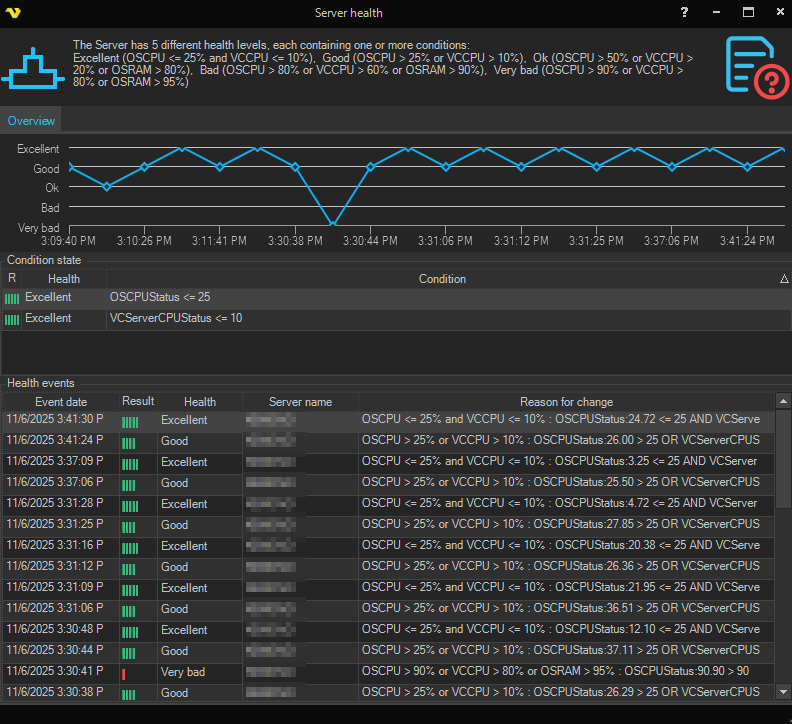
The Overview tab contains:
- A diagram of the recent changes in the Server health level.
- A Condition state section listing the conditions of the current health level.
- A Health events section listing the previous health level changes, with the columns Event date, Result, Health, Server name and Reason for change. Only the most recent 20 health changes are loaded into this dialog.
Please note: Health events are read from the log database, and a health change is only recorded when the level actually changes. If Log to database is turned off in Log settings, the Health events section stays empty and the diagram has no history to display.
A Settings tab is also available where each health level and its conditions are shown and can be edited. The Reset to default button restores the selected health level to its default conditions. The tab is only visible when the Server health settings feature is licensed, and editing also requires the Health states edit permission.
Server health levels
Abbreviations used in the conditions:
- OSCPU - Total CPU consumption of the whole computer (%), across all processes.
- VCCPU - CPU consumption by the VisualCron Server process (%). This value is divided by the number of logical processors, so it expresses VisualCron's share of the entire computer's CPU capacity, not of a single core. It is therefore lower than the per-core figure shown by the Windows Task Manager.
- OSRAM - Physical memory in use on the whole computer (%), across all processes, calculated as total physical memory minus available physical memory. This is not the memory used by VisualCron.
Please note: the memory consumed by the VisualCron Server process itself is not part of any default health level. A separate VC Server memory (%) condition type is available if you want to add it, but by default a Bad or Very bad level caused by memory always refers to the memory usage of the whole computer.
| Level | Name | Conditions |
|---|---|---|
 | Excellent | OSCPU <= 25% and VCCPU <= 10% |
 | Good | OSCPU > 25% or VCCPU > 10% |
 | OK | OSCPU > 50% or VCCPU > 20% or OSRAM > 80% |
 | Bad | OSCPU > 80% or VCCPU > 60% or OSRAM > 90% |
 | Very Bad | OSCPU > 90% or VCCPU > 80% or OSRAM > 95% |
Please note: when the built-in default conditions change in a new VisualCron version, customized health conditions are automatically reset to the new defaults. If you have tuned your thresholds, review the Settings tab after upgrading.
How the health level is decided
- Server statistics are sampled approximately once per second while a Client is subscribed to Server statistics, and once every three seconds otherwise. The health level is re-evaluated on every sample.
- By default each level is evaluated against a single, instantaneous sample. There is no averaging and no minimum duration, so a brief CPU spike is enough to change the level, and the level can change back on the very next sample. This is why the diagram often shows the level alternating between two neighbouring levels.
- Levels are evaluated from worst to best, and the first level whose conditions match is the one reported. The level therefore reflects the worst matching condition, not a combined score.
- Because the Good level is defined on CPU only, a computer with low CPU usage but high memory usage moves directly between OK and Excellent and never reports Good. This is expected behaviour.
- Each of the OSCPU, VCCPU and OSRAM conditions can optionally be given a duration and a Check average option in the Settings tab. Adding a duration prevents momentary spikes from changing the level.
Troubleshooting a Bad or Very bad level
The health level reports the state of the computer, so a level that stays at Bad or Very bad for a long period means the underlying value really is above the threshold, and not that the indicator is stale.
To find the cause:
-
In the Health events section, read the Reason for change column of the newest row. It contains the condition that matched together with the actual measured values, for example:
OSCPU > 90% or VCCPU > 80% or OSRAM > 95% : OSCPUStatus:7.70 > 90 OR VCServerCPUStatus:0.13 > 80 OR OSRAMStatus:95.08 > 95In this example both CPU values are far below their thresholds and only OSRAM is over the limit, so the cause is the memory usage of the computer.
-
Open Tools > Server monitor to see the current Total memory used, Total memory available and VisualCron memory usage values side by side.
-
Open Tools > Task Manager, select the System processes tab and sort by the Working set column to identify which process on the computer is holding the memory. Sort by CPU if a CPU condition is the one being matched.
-
Run the Server: Computer report from the Reports menu to see the history of memory and CPU consumption and confirm whether the value is climbing over time.
Please note: the health level is informational. No Job or Task execution is prevented, delayed or throttled because of it. The health level is only acted upon in a load balancing setup, where it can be used to select the best Server Agent or as a load balancing condition.
Raising the thresholds in the Settings tab makes the indicator report a better level, but it does not change the resource usage that triggered it. Where the reported values are genuinely high, address the resource usage on the computer instead.