Global - Connections
Based on the nature of some Jobs, Tasks or Notifications, a Connection is an essential part of the settings for that entity. Connections are global which means they are centrally stored and can be accessed by related Tasks and Triggers. Connections are used to specify to where and how VisualCron should connect to various instances like FTP servers, SQL servers etc. If a password to a FTP server has changed you only need to updated that in the Connection - not every Task it is used in.
Connections are viewed and updated in the Server > Global objects > Connections window. The connections may also be managed by Add/Edit Job -> Tasks -> Add/Edit -> Task type. Connections are global, thus if you change a connection definition, this will affect all entities using this connection.
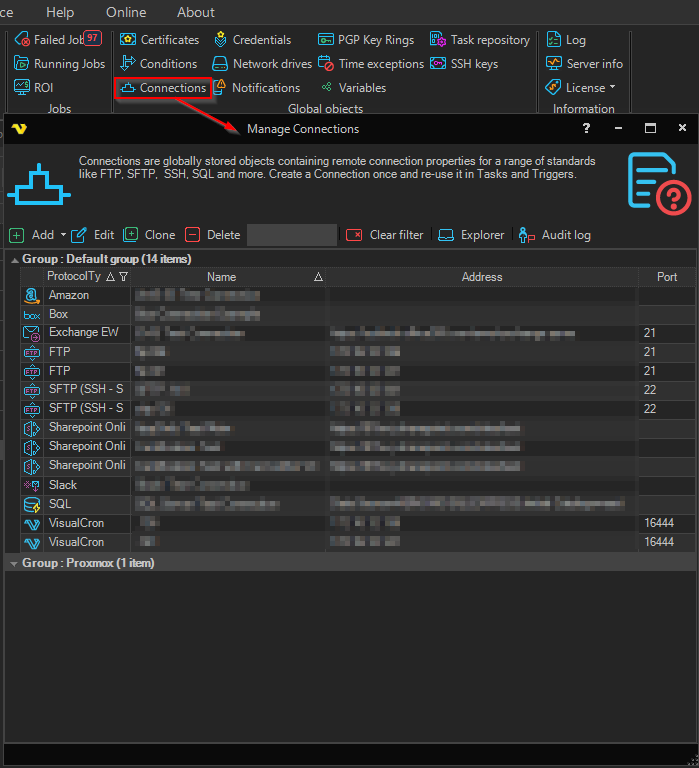
The Manage Connections window displays the configured Connections in a grid with the following columns:
- Address — the host name, server, or address part of the Connection
- Protocol type — the protocol used by the Connection (FTP, SFTP, SQL, etc.)
- Name — the friendly name of the Connection
- Port — the port number (when applicable to the protocol)
- Group — optional Connection group used to organise the list
Connections can be grouped by the Group column (Outlook‑style collapsible groups). Use the Search text box in the toolbar to filter the list by Name, Address, or Group.
The toolbar provides the following buttons (left to right):
Add
A dropdown that opens a list of supported Connection protocols. Pick a protocol to open the editor for a new Connection of that type.
Edit
Open the selected Connection in the editor.
Clone
Create a copy of the selected Connection.
Delete
Delete the selected Connection.
Explorer
Many connections use some kind of explorer to test and navigate with the selected Connection, for example; SQL Explorer, Connection Explorer. Select a Connection and click on Explorer button.
Audit log
Click this button to view the Audit log for Connections.
Clear filter
When you open Manage Connections from a Task only the related protocols are visible. Click Clear filter to view all.
Context menu
Right‑clicking a Connection in the grid opens a context menu with the toolbar commands plus the following additional options:
- Versions — view the version history for the Connection
- Object relations — view other VisualCron objects (Jobs, Tasks, Triggers) that reference this Connection
- Export — export the selected Connection
Currently the following Connection protocols exist:
- AMQP
- Amazon
- AS/400
- Box
- Crystal reports
- Dropbox
- Dynamics CRM
- Exchange EWS
- Exchange WebDAV
- FTP
- FTP SSL Implicit
- FTP TLS Implicit
- FTP SSL Explicit
- FTP TLS Explicit
- Google Cloud
- Google Drive
- IBM Cognos Analytics
- IIS
- IMAP
- Informatica
- Microsoft Azure
- Office 365
- OneDrive
- PeopleSoft
- POP3
- Pushbullet
- SAP
- SCP
- SFTP
- SharePoint
- Slack
- SMTP
- SQL
- SSH
- SSRS
- TCP
- Telegram
- Telnet
- Twitter (deprecated from VisualCron v13.2.1)
- VisualCron
- VMWare
- WebDAV
- XendApp
Click on protocol link above to read more information and connection setting specifics of that protocol.