SLA - Uptime, Outages, Latency
The main menu Server -> SLA group shows three service-level values for the Server you are connected to. They show how much of the last day the Server was running, how often it went down, and how quickly it answers. Use them to check the Server's availability, or to choose a Server in a load balancing setup.
Each value refreshes once a minute. Until the Server has collected statistics, the buttons show no value.
Uptime
The share of the last 24 hours that the VisualCron Server service was running, as a percentage. If the Server has collected statistics for less than 24 hours, for example after a new installation, the percentage covers that shorter period. Turning the Server "Off" does not lower uptime, because the service keeps running.
Outages
The number of times in the last 24 hours that the VisualCron Server service was not running. An outage is recorded when the service starts again, so stopping or restarting the service, a crash and a shutdown of the computer each count as one outage.
Latency
The highest response time, in milliseconds, in about the last minute. It is measured from the ping round trips of logged-on Clients and, in a load balancing setup, from the Server's own pings to the load balancing broker. When no new measurements arrive, for example when no Client is connected, the last value is kept.
Server SLA window
Click any of the three buttons to open the Server SLA window, which updates in real time. Not every edition includes this window; if yours does not, the Client shows a "Feature not available" message instead. The same content is available as the Server: SLA report on the Reports menu (see Reports).
Server -> SLA -> Uptime, Outages or Latency
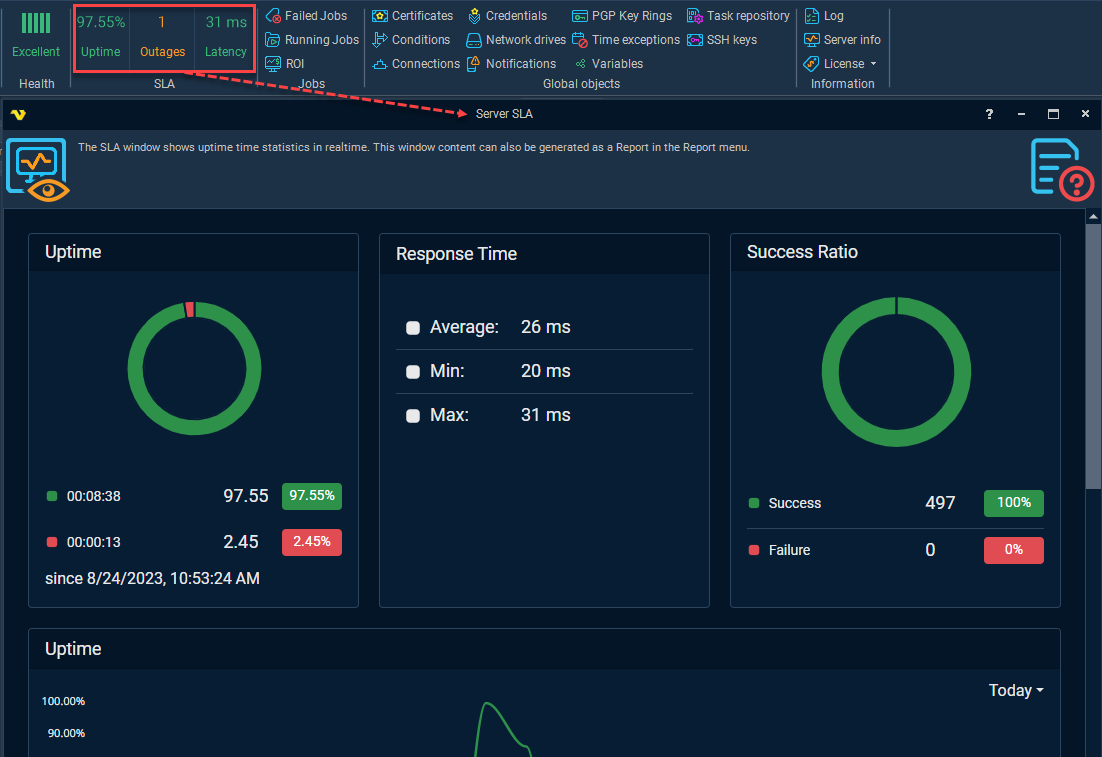
The window shows:
- Uptime: running and down time in the same period as the Uptime button, as times and percentages, with the date the period starts
- Response Time: the Average, Min and Max response time in about the last minute
- Success Ratio: the number and share of successful and failed Job runs, read from the Job log in the log database, so it depends on Log to database
- Charts of the Server's history, with a list for the time range, for example "Today"
Stored data
The Server keeps its SLA statistics in a file in the Server's settings folder, not in the log database, so the Uptime, Outages and Latency values do not depend on Log to database. The file is saved every minute and when the service stops. It holds:
- A running total of uptime, and uptime per hour for about the last day, per day for about the last year, per month for about the last five years, and per year for the last ten years
- Response time per minute for about the last hour, and per hour, day, month and year for the same periods as uptime
- A record of each outage, and outage counts per hour, day, month and year
Use in load balancing
Uptime and latency are also available as load balancing conditions: Daily Server uptime (%) and Maximum response time (ms). See Load Balancing Flows for how to use load balancing Flows and set up their conditions.