Conditions - Actions
The condition set actions control what happens depending on the results of the conditions in the condition set. All results are calculated to one final result.
Global > Conditions > Add/Update Condition set > Actions tab
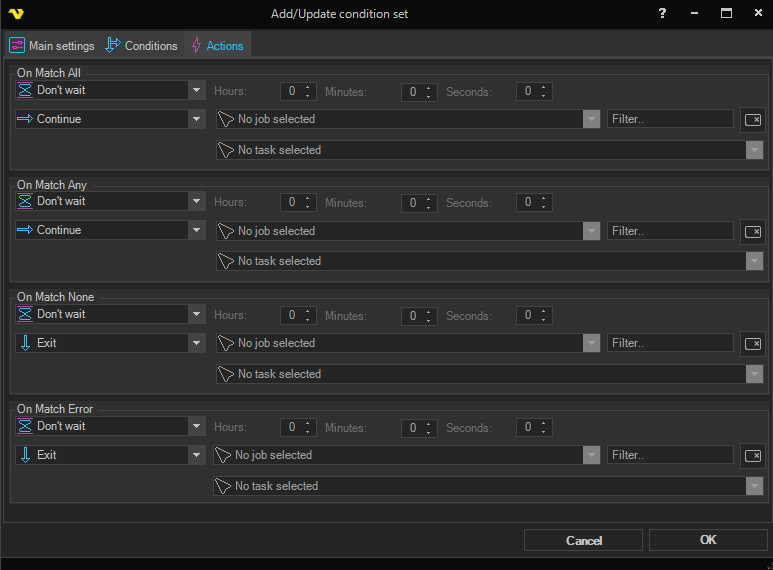
The condition set criteria determine how the results of all included conditions in the set are evaluated. The following criteria are valid:
- On Match All - all conditions returned a "match"
- On Match Any - one or more conditions returned a "match"
- On Match None - none of the conditions returned a "match"
- On Match Error - the condition check failed in some way (for example "access denied" while checking a file condition)
For each criterion, an action can be configured. The available actions are:
- Wait - wait a specified time (always available)
- Continue - run the Task or Job if there is a match (default for On Match All and On Match Any)
- Next - run the next Task in the queue (skip the current one)
- Retry - wait the specified time and re-check the condition
- Exit - exit the current Job (default for On Match None and On Match Error)
- Run Job - exit the current Job and run a specified Job
- Run Task - run a specified Task in the current Job; afterwards, continue with the next Task in order
Wait notes
The wait for each action is a pause between the actual condition check and the action. It can be used in several ways but is most commonly used with the Retry action — for example, if a file does not exist on the first check the result is Match None; with that result you want to Retry (check again) and the Wait parameter adds a pause between each check.
The Wait is not used at the first check when using the Retry action — it does not pause before the first check, only on subsequent retries. For other action types, the Wait always applies regardless of whether it is the first time or not.
Run Task notes
When Run Task is used, VisualCron tries to find the specified Task within the current Job. If found, it runs that Task and any Tasks that follow, in order. When the Task does not reside within the current Job, VisualCron only runs that Task on its own and no following Tasks.
How the actions affect Jobs and Tasks
The actions have different effects on Jobs and Tasks. The simple reason is that Jobs by themselves have no connection to each other in the way Tasks do, which are internally connected within a Job.
Actions affecting a Job condition:
- Continue - continues running the Job
- Next - exits the Job
- Retry - waits and re-checks the condition
- Exit - exits the Job
- Run Job - exits the Job and tries to run another Job
- Run Task - exits the Job and runs a single Task
Actions affecting a Task condition:
- Continue - continues running the Task
- Next - runs the next Task (if it exists)
- Retry - waits and re-checks the condition
- Exit - exits the Job
- Run Job - exits the Job and runs Job X
- Run Task - if the Job is the current Job, runs the Task within the same Job process; otherwise starts a new Job and runs the specified Task there
Handling of errors
By default, any error that occurs during a condition check leads to the Exit action. Examples of errors that can occur:
- The condition points to a Job or Task that doesn't exist
- An error occurs in a condition check
- "Access denied" on files or folders
Task flow only makes sense when Run Tasks in order is enabled on the Job. Task conditions are only checked on Jobs that have Run Tasks in order turned on.
- The condition points to a Job or Task that doesn't exist
- An error occurs in a condition check
- "Access denied" on file or folders
Task flow only makes sense when using Run Tasks in order. Task conditions are only checked on Jobs which has the setting Run Tasks in order on.