Condition - .NET
The .NET condition lets you write your own check in C# or VB.NET, giving the condition almost unlimited flexibility. The method you write must:
- Be located within a class
- Be static (or
Sharedin VB.NET) - Return a boolean
Global > Conditions > Condition set Add > Conditions Add > .NET select > .NET tab
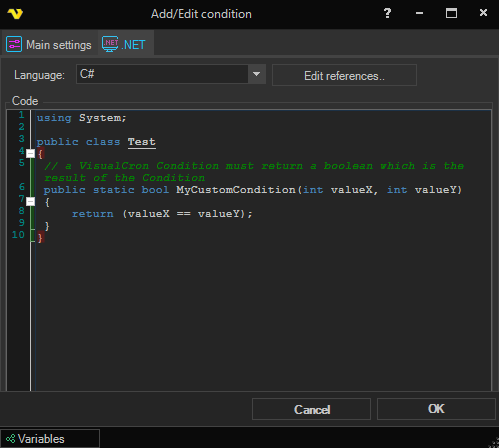
Language
Select C# or VB.NET. The syntax editor and the compile behavior change to match the selected language.
Edit references..
Add or remove DLL references that your code needs in order to compile.
Code
The code editor where you write your check. The code must:
- Live inside a class
- Use static/shared methods only
The boolean returned by the chosen method is the result of the condition.
Method selection
The method that the condition will call when it is evaluated. After editing the code, click Refresh methods to repopulate the drop-down with the static methods found in the code.
Compile
Compiles the code and shows a pop-up if any errors are reported.
Refresh methods
Compiles the code and adds every static method found into the Method selection drop-down.
Run
Compiles the code and runs the selected method using the values from the Parameters grid, so you can test the result.
Parameters
If the selected method takes parameters, they are listed in the grid. Double-click a row to enter a value for that parameter.