Condition - File
The File condition lets you check whether a file exists or check its content before running a Task or Job.
Global > Conditions > Condition set Add > Conditions Add > File select > File tab
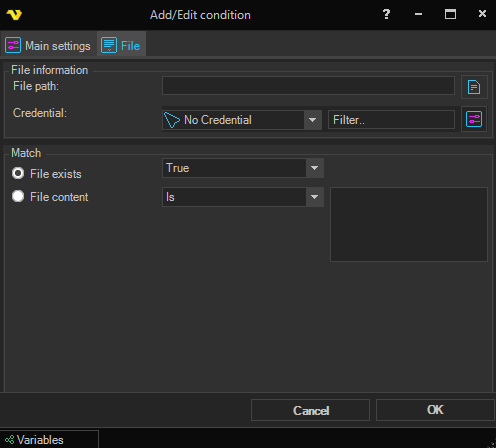
File path
The full UNC path to the file to check. Click the File browser icon to the right to browse for the file.
Credentials
If the file is on a network share or any other protected location, select a Credential for accessing it. Click Manage credentials to add a new Credential.
File exists
Checks whether the file exists. Select True or False to match.
File content
Reads the content of the file and compares it to the value entered in the text box to the right. Available match types:
- Is - matches if the file content equals the value
- Is not - matches if the file content does not equal the value
- Contains - matches if the file content contains the value as a substring