Condition - Folder
The Folder condition checks whether a folder exists on the Server computer or on a network share the Server can reach. Use it, for example, to run a Job only when an output folder is available.
This page describes the Folder tab of the Add/Edit condition window. For the Main settings tab of the window (Condition type, Description, Active), see Conditions - Conditions.
Server -> Global objects -> Conditions -> Add -> Conditions tab -> Add -> Condition type "Folder" -> Folder tab
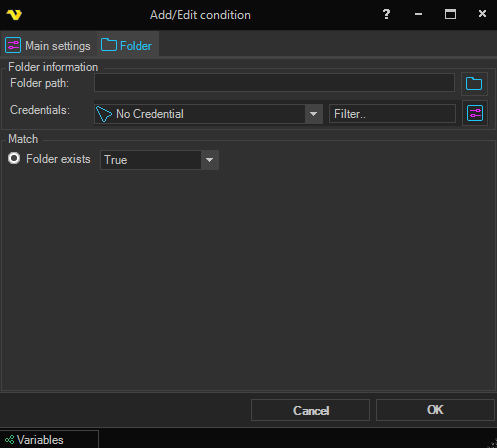
Folder information
Folder path
The full path of the folder, as the Server sees it: a local path on the Server computer, or a UNC path such as \\<server>\<share>\<folder>. Click the browse button to the right of the box to select a folder. You can use Variables in the path, see Global - Variables. Wildcards are not supported: a path that contains "*" or "?" is reported as a folder that does not exist, so "True" does not match and "False" matches. The window does not let you save the condition with an empty path.
The Client can replace a path on a mapped network drive with its UNC path as you type. It does this when the Client runs on the Server computer and the Client setting Auto translate to UNC path is checked, which is the default.
Credentials
Select a Credential when the Server needs another Windows account to reach the folder, for example on a network share. See Global - Credentials. Leave "No Credential" to check the folder with the account the VisualCron service runs under. Use the Filter.. box to search the list. To manage Credentials, click the button to the right of the Filter.. box.
If the selected Credential no longer exists, or the Server cannot log on with it, the condition returns a Match Error and an error is logged.
Match
Folder exists
Select "True" to match when the folder exists, or "False" to match when it does not. The default is "True".
Folder exists cannot tell a missing folder from a path the Server cannot reach. If the share is offline, or the account has no access to it, the check reports that the folder does not exist: "True" does not match and "False" matches. Do not rely on "False" alone to decide that a folder is absent from a network path.