Time Trigger - Expiration
Time Trigger Expiration
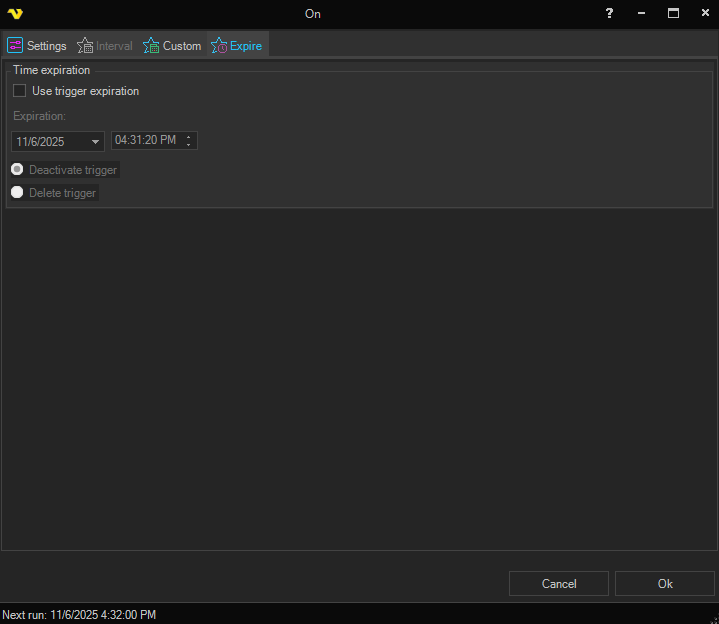
Event Trigger Expiration
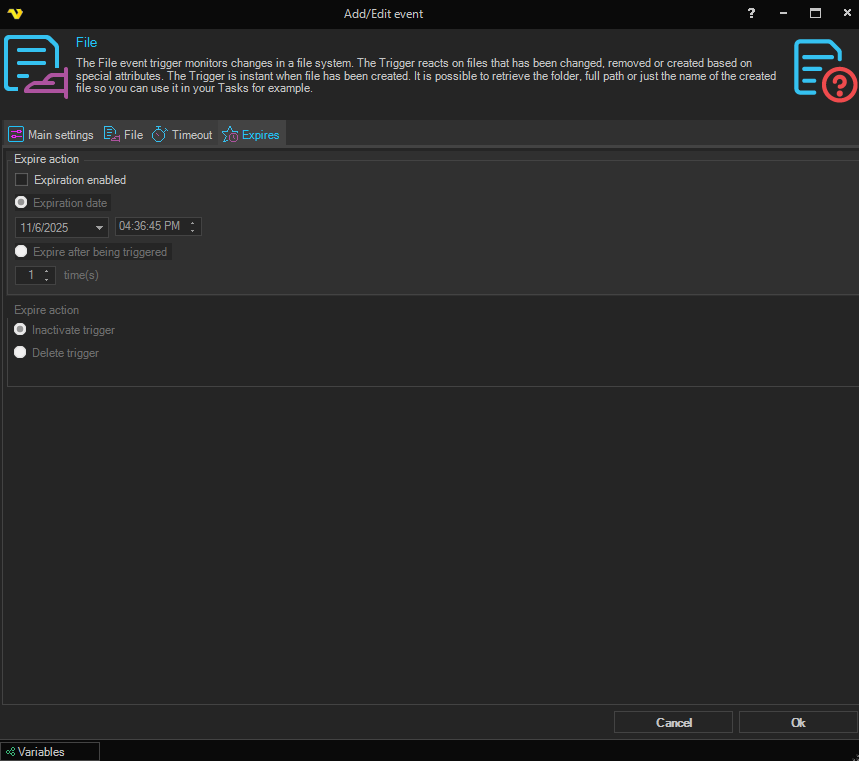
Configure when the time/event trigger should be removed or deactivated.
Use trigger expiration
A master checkbox that enables the expiration controls. When unchecked, the date/time fields and the action radio buttons below are disabled.
Expiration
The expiration date and time. The field is split into a date picker and a separate time picker. When the configured moment is reached, the action selected below is performed on the Trigger.
On the Time Trigger Expiration form, this is the only expiration mode available — Time Triggers always expire at a specific date and time.
On the Event Trigger Expiration form (see Event Triggers) an additional radio mode is available that lets the Trigger expire after it has fired a given number of times.
Expiration action
Choose what should happen to the Trigger when it expires using the two radio buttons:
- Deactivate trigger — the trigger will still remain in the Job but is inactive and cannot be triggered until it is set to active again
- Delete trigger — the trigger will be deleted from the Job and will never be seen again (default)
Delete trigger is the default and cannot be undone. The Trigger and its settings are gone once it expires. Choose Deactivate trigger if you may want to review or re-enable the schedule later, or if you want evidence that the Trigger existed at all.
What expiration applies to
Expiration acts on the Trigger, not on the Job. The Job itself remains, along with its Tasks and any other Triggers.
A Job whose only Trigger has expired is still present but no longer has anything to start it. It can still be run manually, or by another Job.
Expiration is also independent of a dependency. If an expired Trigger was part of a dependency, see Job Triggers for how the remaining Triggers behave: a deactivated Trigger is taken out of the dependency's requirement, and a deleted Trigger is removed from it entirely.
Examples
- A Job that should only run during a migration window — set the expiration to the end of the window and choose Deactivate trigger, so the schedule can be re-enabled if the window is extended
- A one-off scheduled run — on an Event Trigger, use Expire after being triggered 1 time(s) so the Trigger removes itself once it has fired. See Event Triggers
- A temporary Trigger added while troubleshooting — set a short expiration with Delete trigger so it cleans itself up and cannot be left behind by accident