Interval Time Triggers
Set Time Trigger > Interval tab
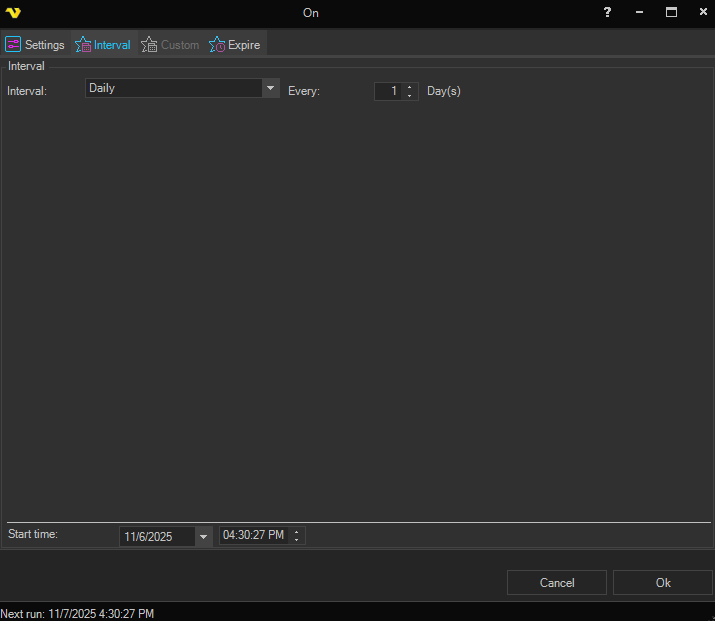
Interval
A dropdown that controls the time unit the Trigger uses. The following options are available:
- Daily
- Hourly
- Minutely
- Secondly
- Specific days of the month
- Specific days of the week
Every
A numeric editor (minimum 1) that controls how many of the selected Interval units must pass between fires. The unit suffix to the right of the field updates automatically (for example, day(s), hour(s), minute(s)). For example, Interval = Hourly, Every = 2 runs the Job every other hour.
Specific days of the month
When Specific days of the month is selected, a panel appears with the following options for choosing which day(s) the Trigger fires on. Pick one of the radio modes:
- Day(s) — pick one or more specific calendar days from a checkbox list of 1 through 31
- Last day of month — fire on the last day of every month
- First / Last (ordinal) day — fire on the 1st, 2nd, 3rd, ... or Last day of the month, chosen via the ordinal dropdown
- First / Last (ordinal) workday — fire on the 1st, 2nd, 3rd, ... or Last workday of the month. A country dropdown becomes available so that the workday calculation can exclude that country's public holidays
Specific days of the week
When Specific days of the week is selected, a panel with seven checkboxes appears (one for each weekday from Monday through Sunday). Tick the days on which the Trigger should fire.
Server Start time
The date and time of the first run occurrence on the Server. The field is split into a date picker and a separate time picker. The Trigger schedule is calculated relative to this start time.
Because the schedule is counted from this value, the start time also sets the offset of the run. An Hourly Trigger with Every = 1 and a start time of 08:20 fires at 20 minutes past every hour, not on the hour.
Examples
- Every 15 minutes — Interval = Minutely, Every = 15
- Every other hour — Interval = Hourly, Every = 2. The start time decides which hours are used, so a start time of 01:00 gives 01:00, 03:00, 05:00 and so on
- Once a day at 22:00 — Interval = Daily, Every = 1, with the start time set to 22:00
- Weekdays only — Interval = Specific days of the week, with Monday through Friday ticked. The time of day comes from the start time
- The 1st and 15th of every month — Interval = Specific days of the month, Day(s) mode, with 1 and 15 ticked
- The last day of every month — Interval = Specific days of the month, Last day of month mode. This correctly handles months of different lengths, including February in a leap year
- The last working day of every month — Interval = Specific days of the month, Last (ordinal) workday mode, with the country set so public holidays for that country are excluded
If the schedule you need cannot be expressed here, use a Custom Time Trigger instead, which allows each time unit to be set individually. The Interval type is a simplified version of the same engine.