Task Event Log - Event Log Write
The Event log Write Task writes an event log record value based on various parameters.
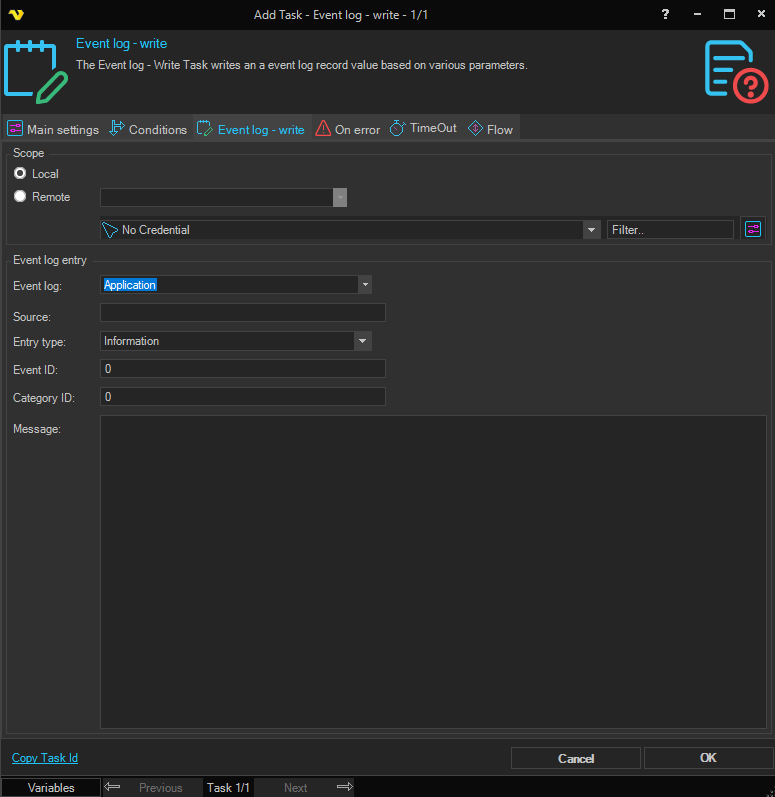
Scope
Local / Remote
Select Local to write to the event log on the local computer. Select Remote to write to the event log on a remote computer. Defaults to Local.
Remote host
Enter the hostname or IP address of the remote computer, or select from the list of network computers. Only available when Remote is selected.
Credentials
To control a remote computer you may need to use a Credential. The Credential must match the user name and password of the user that you want to login for. Select a Credential in the combo box or click the Settings icon to open Manage credentials in order to add or edit Credentials.
Event log entry
Event log
The Windows event log to write to (e.g. Application, System, Security).
Source
The source name to associate with the event log entry.
Entry type
The type of event log entry to write. Options include Error, Information, Warning, FailureAudit, and SuccessAudit.
Event ID
The numeric event ID to assign to the entry.
Category ID
The numeric category ID to assign to the entry.
Message
The message text to write to the event log entry.