Task Event Log - Event Log Read
The Event log Read Task retrieves event log records based on a filter.
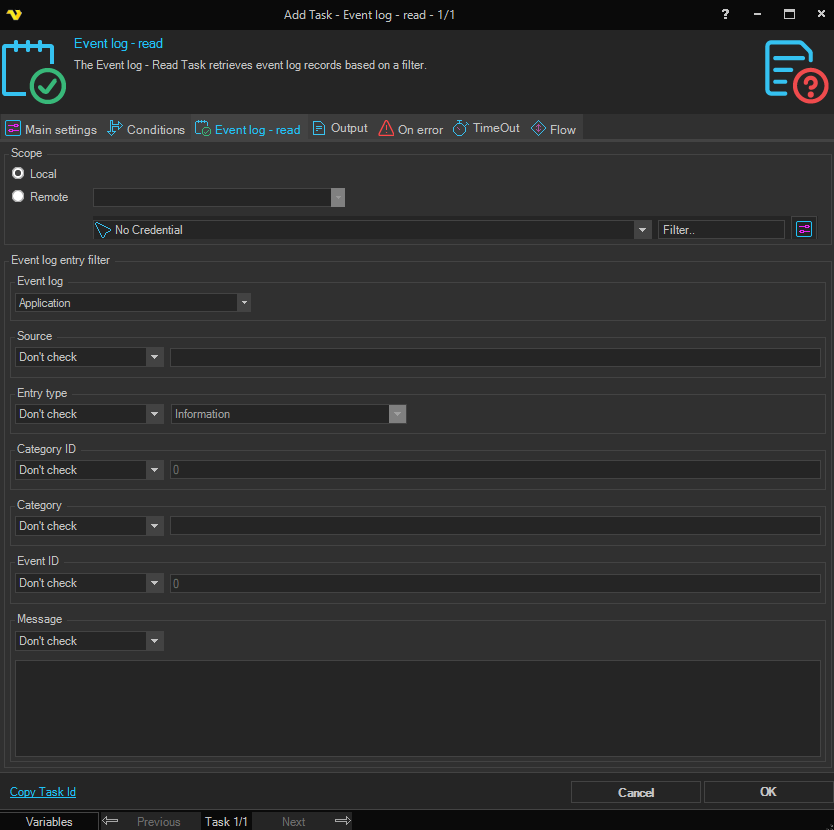
Scope
Local / Remote
Select Local to read the event log on the local computer. Select Remote to read the event log on a remote computer. Defaults to Local.
Remote host
Enter the hostname or IP address of the remote computer, or select from the list of network computers. Only available when Remote is selected.
Credentials
To control a remote computer you may need to use a Credential. The Credential must match the user name and password of the user that you want to login for. Select a Credential in the combo box or click the Settings icon to open Manage credentials in order to add or edit Credentials.
Event log entry filter
Event log
The Windows event log to read from (e.g. Application, System, Security).
Source
Filter entries by source. Select a condition type and enter a value. The value field is disabled when the condition is set to Not check.
Entry type
Filter entries by entry type. Select a condition type and an entry type value. Available condition types: Not check, Equal, Not equal.
Category ID
Filter entries by category ID. Select a condition type and enter a numeric value. The value field is disabled when the condition is set to Not check.
Event ID
Filter entries by event ID. Select a condition type and enter a numeric value. The value field is disabled when the condition is set to Not check.
Category
Filter entries by category name. Select a condition type and enter a value. The value field is disabled when the condition is set to Not check.
Message
Filter entries by the event message text. Select a condition type and enter a value. The value field is disabled when the condition is set to Not check.