Task Informatica - Run Job
The Informatica - Run job Task starts a job in Informatica Cloud, using an Informatica Connection.
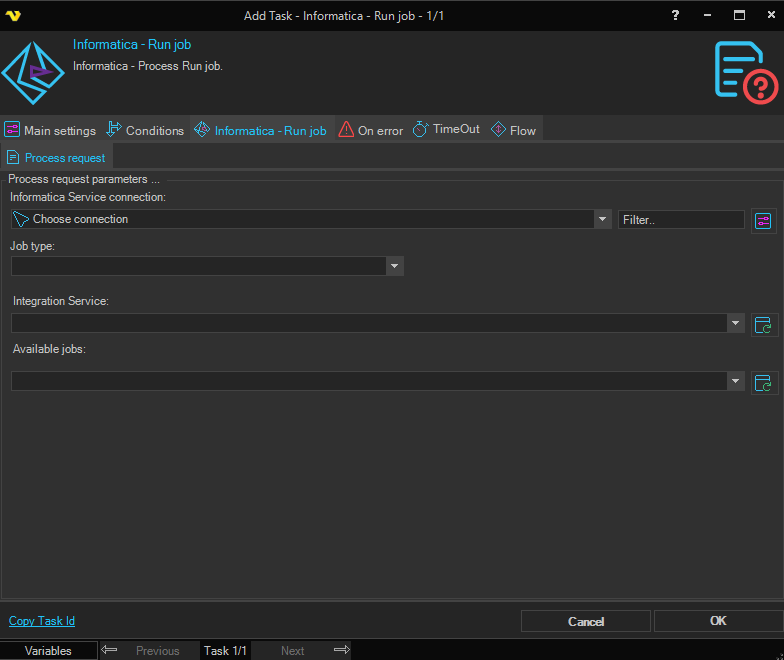
This Task uses an Informatica Connection; see Connection - Informatica. When it signs in, it sets the SSL and TLS versions for the whole Server process, including SSL 3 and TLS 1.0, and, unless another component has already set one, installs a certificate check that accepts any server certificate for HTTPS calls in the Server process.
The Main settings, Flow, On error, Conditions and TimeOut tabs are the same for every Task; see Job - Tasks.
Process request tab
- Informatica Service connection: the Informatica Connection with the address and sign-in. Only Informatica Connections are listed
- Job type: the type of job to run: "DRS", "DSS", "Workflow", "AVS", "DMASK", "DQA", "MTT" or "PCS"
- Integration Service: the Informatica Integration Service. Click the refresh button to fill the list from the Connection
- Available jobs: the job to run. Click the refresh button to fill the list for the selected Job type; select the Connection and the job type first
Output and errors
The Task starts the job and does not wait for it to finish. The output is "Job Run Successfully and job Id: " followed by the run ID that Informatica returns; check the result of the job in Informatica Cloud.
If Informatica answers that the sign-in or the job request failed, the error is written only to the error output, and the Task reports success. To catch this, add an error condition on the error output on the On error tab; see Task - On Error. If Informatica cannot be reached, the Task fails.