Task Exchange - Create Exchange Object
The Create Exchange object Task creates an appointment, a contact or a task in an Exchange mailbox.
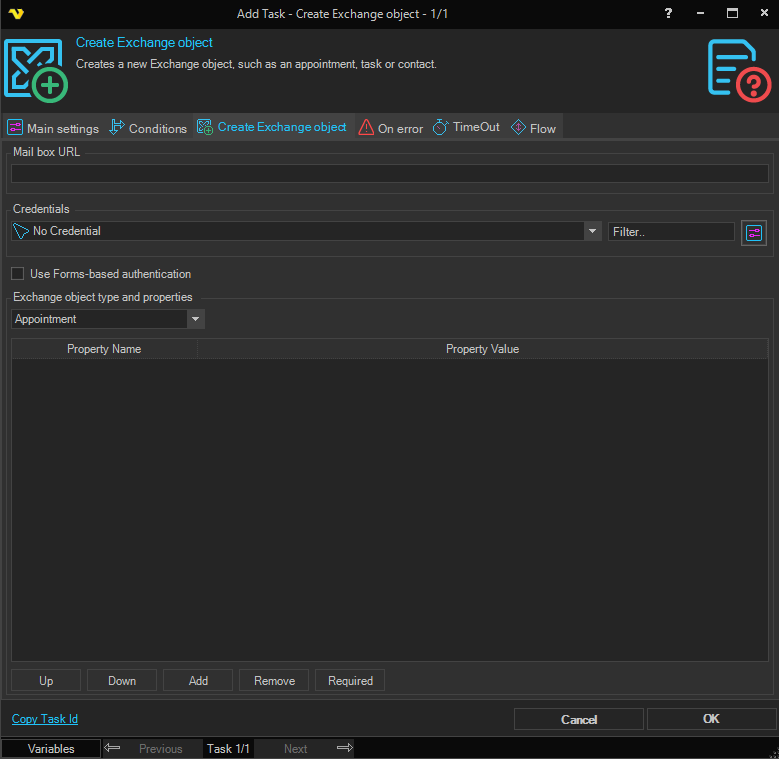
This Task connects to the mailbox with WebDAV and accepts any server certificate, so an address that starts with "https://" does not prove the identity of the server. With Use Forms-based authentication checked, the user name and password of the Credential are posted to the server in a form; with an address that starts with "http://", anyone who can see the traffic can read them. Use an address that starts with "https://", on a network you trust.
The Main settings, Flow, On error, Conditions and TimeOut tabs are the same for every Task; see Job - Tasks.
Create Exchange object tab
- Mail box URL: the WebDAV address of the mailbox, in the form
https://<server>/exchange/<mailbox> - Credentials: the Credential that signs in to the mailbox. A Credential is required; without one the Task fails with a Credential-not-found error. Click the settings button to open Manage credentials; see Credentials
- Use Forms-based authentication: signs in through the forms-based (Outlook Web Access) sign-in page. When cleared, Windows authentication is used
- Exchange object type and properties: the object type, "Appointment" (default), "Contact" or "Task", and the properties to set. Click Add to add a property, Remove to remove the selected one, and Up and Down to move it. Click Required to replace the list with the required properties of the type. Values may contain Variables
Output and errors
The output is a line that confirms the type of object created.
If the mailbox cannot be reached or the request fails, the error is written to the error output and the Task fails.