Task Exchange - Delete Exchange Object
The Delete Exchange object Task deletes one object in an Exchange mailbox, identified by its address.
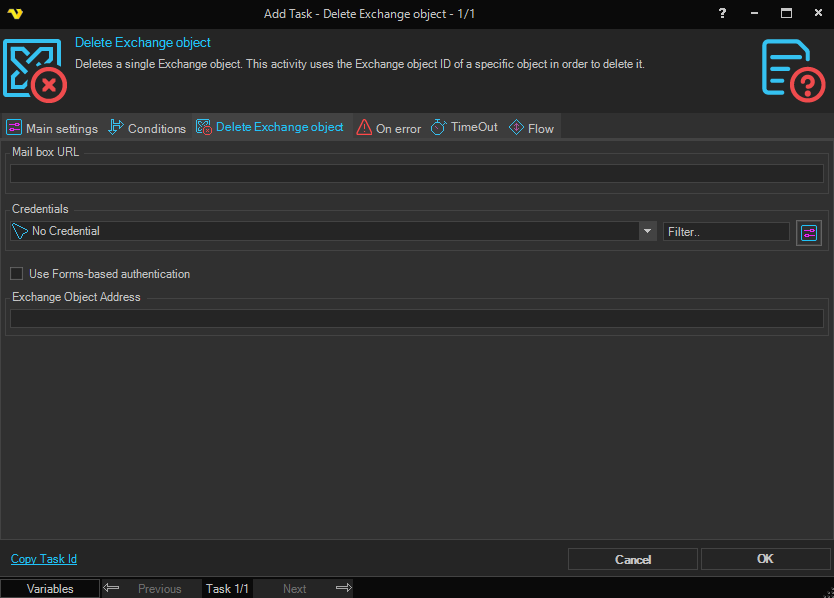
This Task connects to the mailbox with WebDAV and accepts any server certificate, so an address that starts with "https://" does not prove the identity of the server. With Use Forms-based authentication checked, the user name and password of the Credential are posted to the server in a form; with an address that starts with "http://", anyone who can see the traffic can read them. Use an address that starts with "https://", on a network you trust.
The Main settings, Flow, On error, Conditions and TimeOut tabs are the same for every Task; see Job - Tasks.
Delete Exchange object tab
- Mail box URL: the WebDAV address of the mailbox, in the form
https://<server>/exchange/<mailbox> - Credentials: the Credential that signs in to the mailbox. A Credential is required; without one the Task fails with a Credential-not-found error. Click the settings button to open Manage credentials; see Credentials
- Use Forms-based authentication: signs in through the forms-based (Outlook Web Access) sign-in page. When cleared, Windows authentication is used
- Exchange Object Address: the address of the object, relative to Mail box URL, such as
/Calendar/<item>.EML. The Get Exchange object(s) Task lists the full address of each object
The Task sends the delete request for whatever address it is given, also the address of a folder. A Variable that resolves to an empty value targets the Mail box URL itself. Check the address, and any Variable in it, with the Get Exchange object(s) Task first.
Output and errors
The output names the deleted object and its address. If the address is not of a calendar, contact or task item, the output is "No items found.", and the Task still sends the delete request for the address.
If the mailbox cannot be reached or the request fails, the error is written to the error output and the Task fails.