Task MSMQ - Delete Message
The MSMQ - Delete message Task deletes messages from a specified queue. Use the filter section to narrow down which messages are deleted.
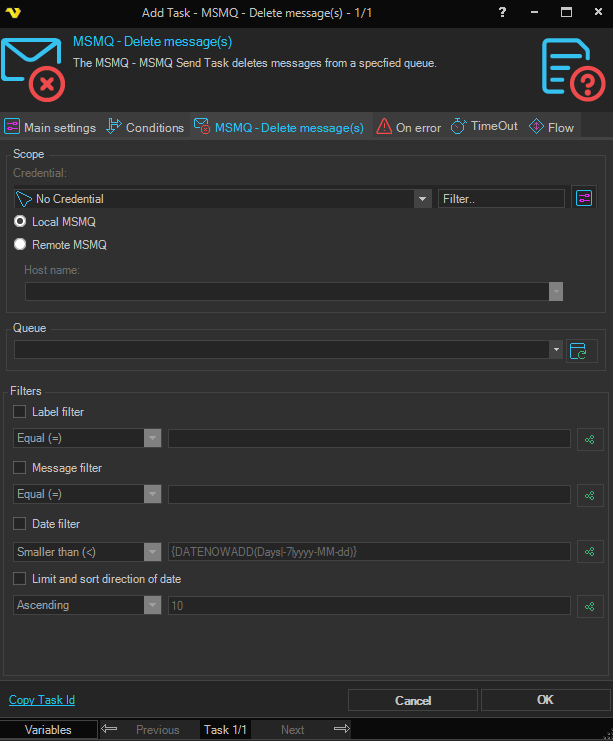
Local MSMQ
Select this radio button if the queue is hosted on the local computer.
Remote MSMQ
Select this radio button if the queue is hosted on a remote computer. The Credential and Host name fields below are enabled only when this option is selected.
Credential
Select a Credential for connecting to the remote computer. The Credential must match a user name and password that has access to the remote MSMQ host. Click the Settings icon to open Manage credentials in order to add or edit Credentials.
Host name
The host name or IP address of the remote computer.
Queue
The name of the queue to delete messages from. Click the Refresh icon to populate the drop-down list of available queues on the selected MSMQ host.
Label filter
When checked, deletes only messages whose label matches the specified condition. Choose the comparison from the drop-down (equal, not equal, contains, does not contain) and enter the value to compare against. Click the Variables icon to insert a Variable.
Message filter
When checked, deletes only messages whose body matches the specified condition. Uses the same comparison options as the Label filter. Click the Variables icon to insert a Variable.
Date filter
When checked, deletes only messages whose timestamp matches the specified condition. Choose the comparison from the drop-down (smaller, larger) and enter the date or Variable to compare against. Click the Variables icon to insert a Variable.
Limit filter
When checked, limits the number of messages that may be deleted in a single run. Choose a sort direction (Ascending / Descending) for the date order in which messages are considered, then enter the maximum count. Click the Variables icon to insert a Variable.