Task Dynamics CRM - Set Audit Status
The Dynamics CRM - Set audit status Task turns auditing on or off for the organization, for an entity, or both, in Dynamics CRM, using a Dynamics CRM Connection.
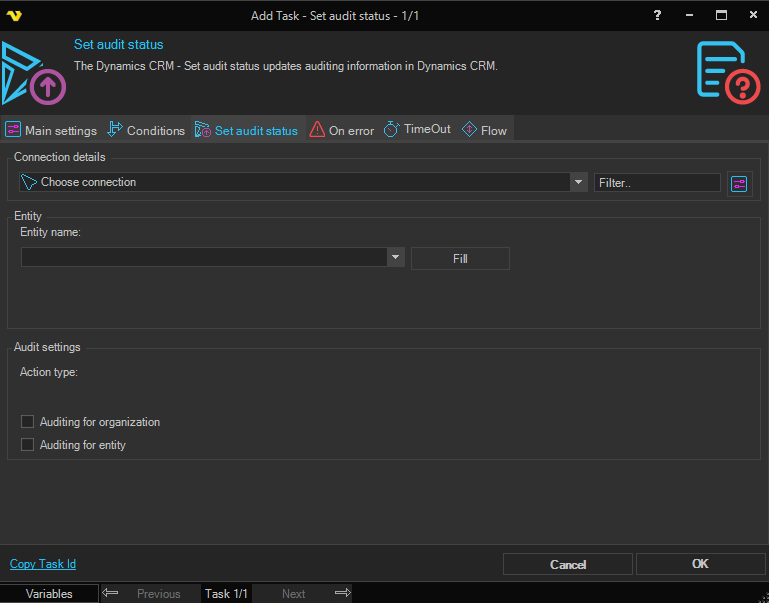
The Main settings, Flow, On error, Conditions and TimeOut tabs are the same for every Task; see Job - Tasks.
Set audit status tab
- Connection: in the Connection details group, the Dynamics CRM Connection to use; see Connection - Dynamics CRM. Click the Settings icon to open Manage Connections
- Entity name: the logical name of the entity whose auditing to change. It is used only with Auditing for entity. Click Fill to list the entities
In the Audit settings group:
- Action type: "Enable" (default) or "Disable"
- Auditing for organization: applies the action to auditing for the whole organization
- Auditing for entity: applies the action to auditing for the selected entity
When neither check box is selected, the Task changes nothing and succeeds.
If auditing is not enabled at the organization level, auditing of entities and attributes, even if it is enabled, does not occur. By default, auditing is enabled on all auditable entity attributes but is disabled at the entity and organization level.
Output and errors
The Task writes no output. When Dynamics CRM rejects the request, or the Connection cannot connect, the Task fails with the error that is returned.