Task Dynamics CRM - Create Entity
The Dynamics CRM - Create Entity Task creates a record of an entity in Dynamics CRM, using a Dynamics CRM Connection.
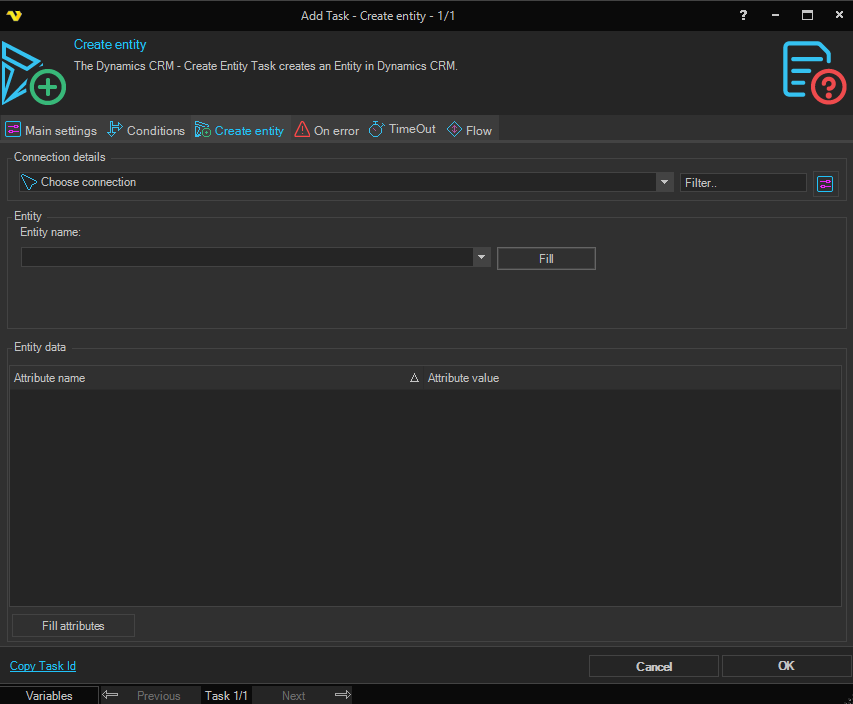
The Main settings, Flow, On error, Conditions and TimeOut tabs are the same for every Task; see Job - Tasks.
Create entity tab
- Connection: in the Connection details group, the Dynamics CRM Connection to use; see Connection - Dynamics CRM. Click the Settings icon to open Manage Connections
- Entity name: the logical name of the entity (the record type), for example
accountorcontact. Click Fill to list the entities of the Dynamics CRM instance - Entity data: the attribute values of the new record, one row for each attribute, with the Attribute name and Attribute value columns. Click Fill attributes to list the attributes that an existing record of the selected entity has, then type the values. Variables are resolved in the values. Attributes with an empty value are not set
Values are sent as text. Attributes of other types, such as option sets, lookups, numbers, money and dates, may be rejected by Dynamics CRM, and the Task then fails.
Variables are not resolved in Entity name.
Output and errors
The output is Created Entity Id: <ID>, with the ID of the new record. When Dynamics CRM rejects the request, or the Connection cannot connect, the Task fails with the error that is returned.