Task Office365 - Update Calendar Event
The Office365 - Update Calendar event Task lets you update a Calendar event in the Office365 cloud. The Task uses the Office365 Connection.
Office365 - Update calendar events tab
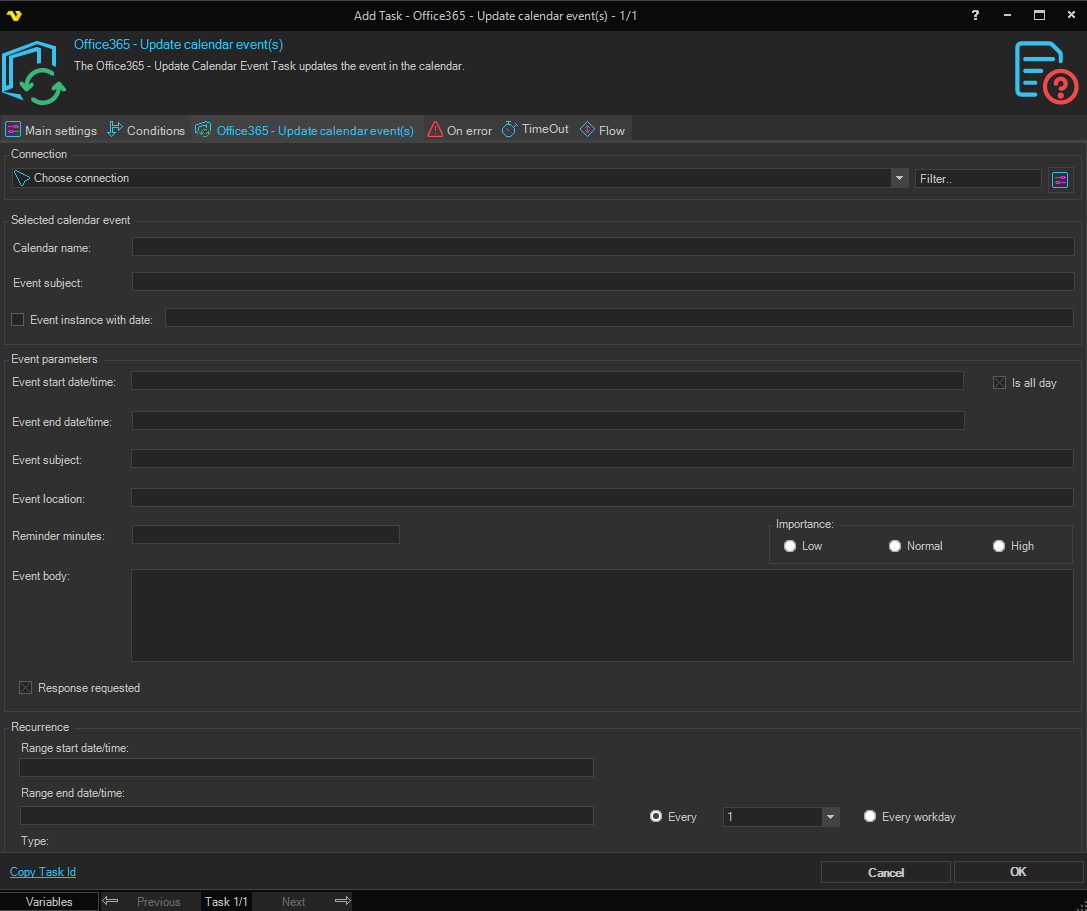
Connection
To use the Office365 Tasks you need to create a Connection first. Click the Settings icon to open the Manage Connections dialog.
Identify the event to update
Calendar name
The name of the calendar that contains the event. Leave empty to use the default calendar.
Event subject
The current subject of the calendar event to update. Required.
Event instance with date
When checked, only the single occurrence of a recurring event on the specified date is updated; the rest of the series is preserved. Enter the date of the occurrence in the field next to the checkbox.
New event values
Event start date/time
The new start date and time of the event. Required when All day is unchecked.
Event end date/time
The new end date and time of the event. Required when All day is unchecked.
All day
When checked, the event is set as an all-day event and the start and end date/time fields are disabled. Use the indeterminate (greyed) state to leave the all-day flag unchanged.
Event subject (new)
The new subject (title) for the event.
Event body
The new body text for the event.
Event location
The new location for the event.
Reminder minutes before start
The number of minutes before the start time at which a reminder should be raised.
Importance
The importance flag stored on the event. Available options:
- Low
- Normal
- High
Response requested
Sets whether responses are requested from invited attendees. Use the indeterminate (greyed) state to leave the value unchanged.
Recurrence range start / end
The first and last date on which the recurring event should occur. Leave empty for a non-recurring event.
Recurrence pattern type
How often the event repeats. Available options:
- Daily
- Weekly
- Monthly
- Yearly
The recurrence sub-fields below show or hide automatically based on the selected Type.
Interval
The interval between recurrences (for example, "every 2 weeks"). Hidden for Daily.
Month
The month in which the event recurs. Used only for Yearly.
Day / Every
The day-of-the-month or recurrence anchor for the event. The label and behavior change with the selected Type.
Day of month
The numeric day of the month on which the event recurs.
Index
For relative monthly or yearly recurrence, selects the occurrence within the month (First, Second, Third, Fourth, Last).
Days of week
The days of the week on which the event recurs. Multiple days can be selected.