Task Service - Stop Service
The Stop service Task stops a Windows service on the Server computer or on a remote computer, and waits until it has stopped.
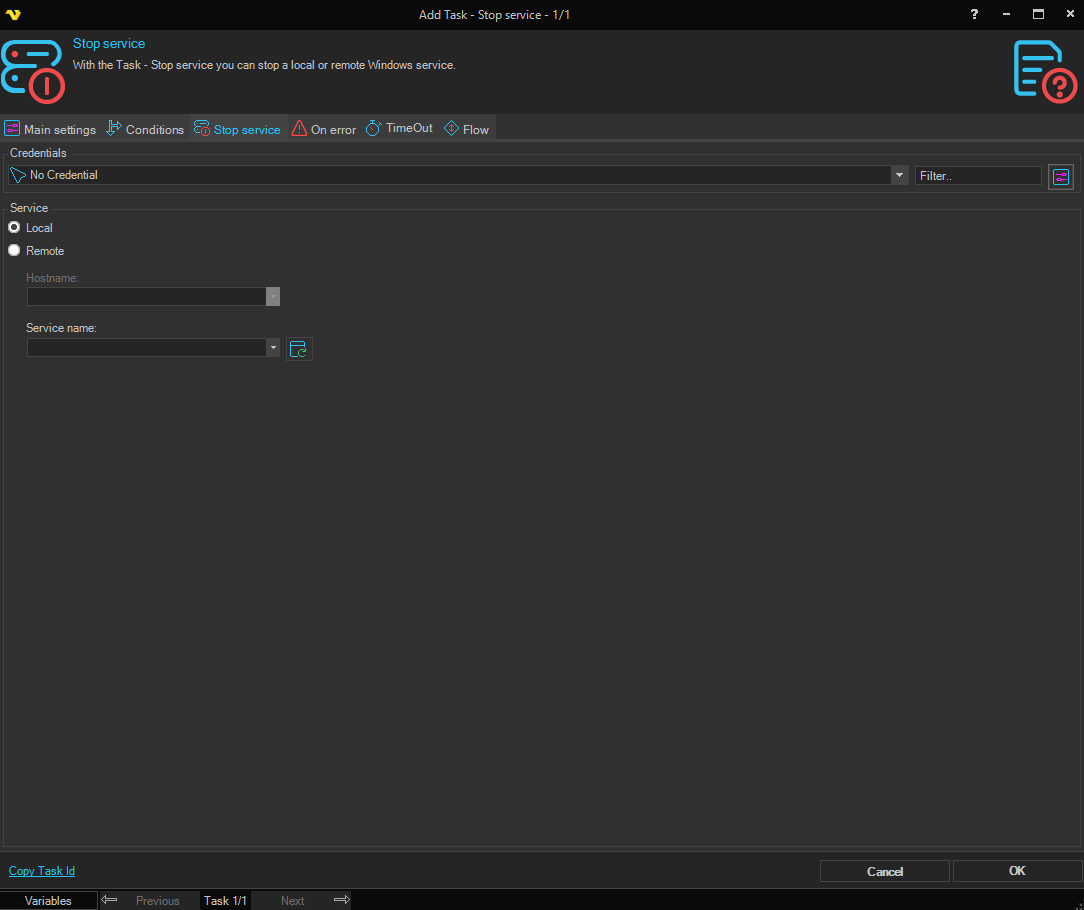
The Main settings, Flow, On error, Conditions and TimeOut tabs are the same for every Task; see Job - Tasks.
Stop service tab
Credentials
The Credential the Task runs as to control a service on a remote computer. It is used only with Remote. Click the settings button to open Manage credentials; see Credentials.
Service
- Local (default): the service runs on the Server computer
- Remote: the service runs on another computer
- Hostname: the name of the remote computer. Available with Remote
- Service name: the name of the service to stop. Type it, or click the refresh button to fill the list with the services of the computer. Host name and service name may contain Variables
Output and errors
The output says the service was successfully stopped, also when it was already stopped.
warning
The Task waits until the service has stopped, without a time limit of its own. A service that is paused, or that does not finish stopping, keeps the Task waiting. Set a time limit on the TimeOut tab.