Task Active Directory - Delete AD Object
The Delete AD Object Task deletes an Active Directory object, for example a user, computer or printer.
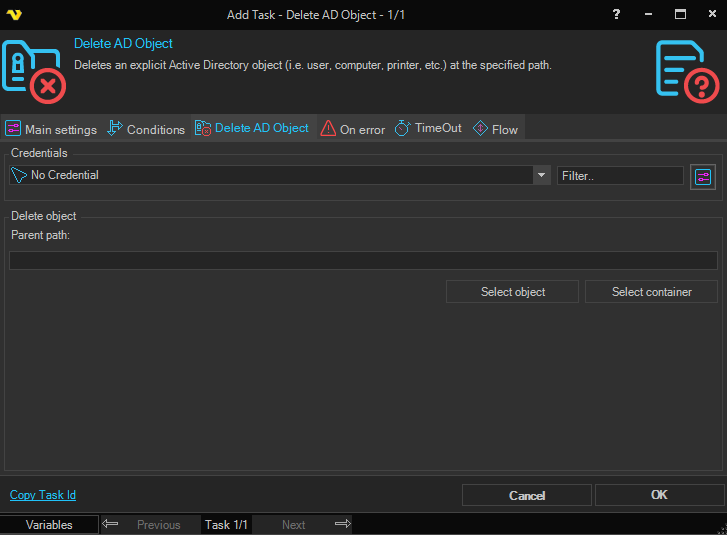
The Task deletes the object whose path is in Parent path. Despite its label, the field holds the path of the object to delete, not of its container: a container path in this field deletes that container. Check the path before you run the Task. VisualCron cannot undo the deletion.
The Main settings, Flow, On error, Conditions and TimeOut tabs are the same for every Task; see Job - Tasks.
Delete AD Object tab
-
Credentials: the Credential that the Task uses to connect to Active Directory; see Global - Credentials. Click the Settings icon to open Manage credentials
With "No Credential", the Task connects as the account that the VisualCron Server service runs as. The account that is used needs permission in Active Directory for what the Task does.
When the selected Credential has been deleted, the Task fails, but it may already have carried out the change as the account of the VisualCron Server service.
-
Parent path: despite its label, the LDAP path of the object to delete itself, not of its container, for example
LDAP://CN=<name>,OU=<unit>,DC=<domain>,DC=<suffix>. Click Select object to pick the object. Select container puts the path of a container in the field instead
Output and errors
The Task writes no output. An object that contains other objects is not deleted, and the Task fails. When Active Directory rejects the request, for example because the account does not have permission or the object does not exist, the Task fails with the error that Active Directory returns.