Task Active Directory - Modify AD User
The Modify AD User Task enables, disables, deletes or renames an Active Directory user, or resets the user's password.
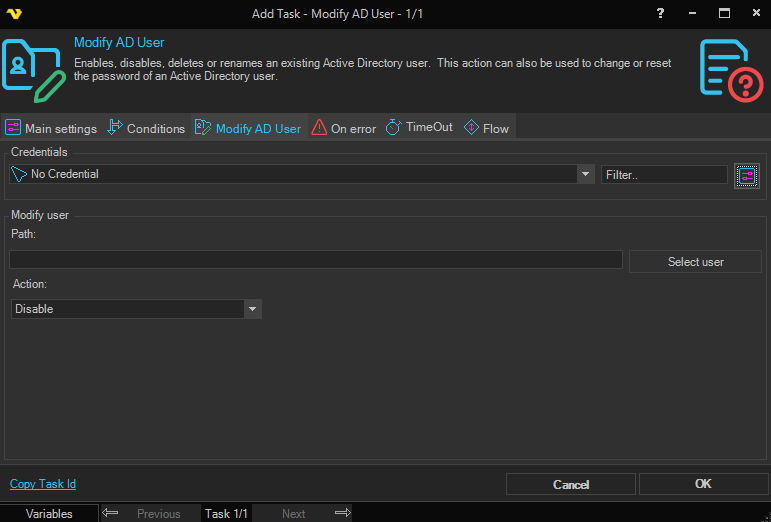
The Main settings, Flow, On error, Conditions and TimeOut tabs are the same for every Task; see Job - Tasks.
Modify AD User tab
-
Credentials: the Credential that the Task uses to connect to Active Directory; see Global - Credentials. Click the Settings icon to open Manage credentials
With "No Credential", the Task connects as the account that the VisualCron Server service runs as. The account that is used needs permission in Active Directory for what the Task does.
When the selected Credential has been deleted, the Task fails, but it may already have carried out the change as the account of the VisualCron Server service.
-
Path: the LDAP path of the user. Click Select user to pick it
-
Action: "Disable" (default), "Enable", "Delete", "Rename" or "Reset password"
- "Rename" changes the user's common name (CN) to New value. The logon names do not change
- "Reset password" sets the password to New value and also unlocks the account if it is locked out
- "Delete" deletes the user
-
New value: the new name or the new password. It is shown only for "Rename" and "Reset password". The box shows the value as it is typed; the Task stores it encrypted
With "Delete", the Task deletes the user at Path. VisualCron cannot undo the deletion.
Output and errors
The Task writes no output. When Active Directory rejects the request, for example because the account does not have permission or the object does not exist, the Task fails with the error that Active Directory returns.
Troubleshooting
Error 0x80072035
Active Directory returns error 0x80072035 ("The server is unwilling to process the request") when the password does not meet the domain's password policy, for example its length, complexity or password history rules. Use a password that meets the policy.