Task Active Directory - List AD Object Paths
The List AD Object Paths Task lists the LDAP paths of the Active Directory objects, such as computers, users and groups, at and below a container that match a filter.
The Main settings, Flow, On error, Conditions and TimeOut tabs are the same for every Task; see Job - Tasks.
List AD Object paths tab
-
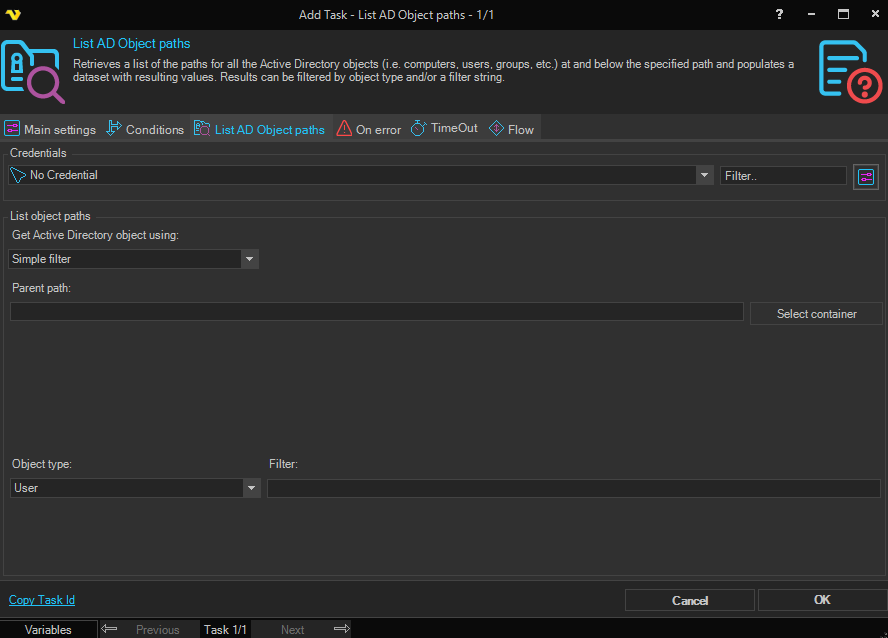
Credentials: the Credential that the Task uses to connect to Active Directory; see Global - Credentials. Click the Settings icon to open Manage credentials
With "No Credential", the Task connects as the account that the VisualCron Server service runs as. The account that is used needs permission in Active Directory for what the Task does.
When the selected Credential has been deleted, the Task fails, but it may already have read Active Directory as the account of the VisualCron Server service.
-
Get Active Directory object using: how the objects are selected: "Simple filter" (default), "Custom filter" or "ADO Query". The fields below change with the choice
-
Parent path: the LDAP path of the container to search. The Task searches the container and every container below it, for example
LDAP://OU=<unit>,DC=<domain>,DC=<suffix>. Click Select container to pick it
With "Simple filter":
- Object type: "User" (default), "Computer", "Organization Unit", "Group" or "Printer"
- Filter: the name of the objects to list.
*matches any characters, so*lists every object of the type
With "Custom filter":
- Query statement (SQL or LDAP syntax): an LDAP search filter, for example
(&(objectCategory=user)(department=Sales)). With "Custom filter", the statement is used as an LDAP filter only
With "ADO Query", the Client saves the Query statement as a custom filter and not as a query, so the Task does not run the statement and fails. Use "Custom filter" with an LDAP filter instead.
Output and errors
The output has the LDAP path of each object found, one per line. When no object matches, the output is empty and the Task succeeds.
Active Directory returns at most 1,000 objects by default. When more objects match, the rest are left out, and the Task reports success. Narrow the filter or the container.