Task Hyper-V - List VM
The Hyper-V - List VM Task lists the virtual machines on the VisualCron Server computer or on a remote Hyper-V host.
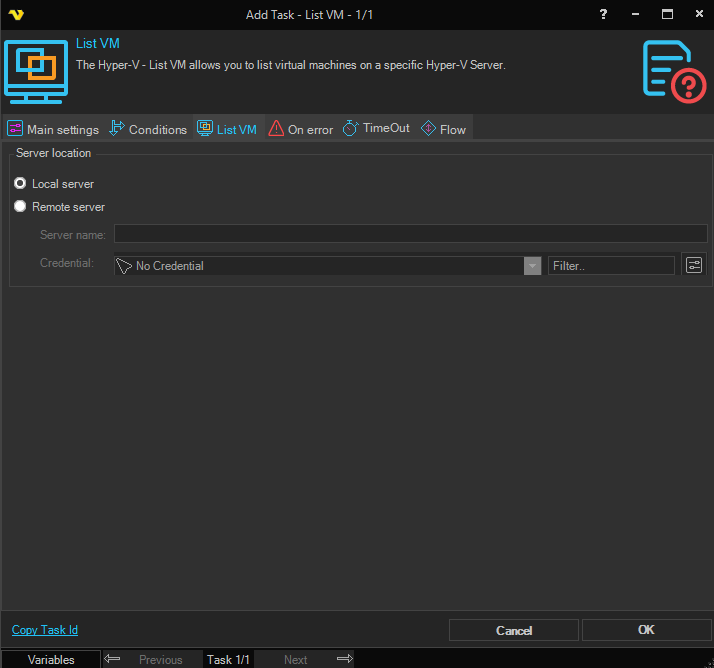
With Remote server, the Credential's user name and password are written as plain text into the PowerShell script that runs on the VisualCron Server computer; see Hyper-V Tasks overview. Errors that PowerShell reports while the command runs, such as an unknown virtual machine name or a failed remote sign-in, are not checked, and the Task reports success.
The Main settings, Flow, On error, Conditions and TimeOut tabs are the same for every Task; see Job - Tasks.
List VM tab
- Local server: run the command on the VisualCron Server computer. Selected by default
- Remote server: run the command on another computer through PowerShell remoting
- Server name: the host name of the remote Hyper-V computer. Variables are not replaced in this field
- Credential: the Credential to sign in to the remote computer. Required with Remote server. The Credential's domain is not used, so enter the user name of a domain account as
DOMAIN\user. Click the Settings icon to add or edit Credentials
Output and errors
The output has the name of each virtual machine on its own line. An error that stops the PowerShell script makes the Task fail. Other errors are not checked; see Hyper-V Tasks overview.