Event Trigger - Registry
The Registry event trigger monitors a change in a registry tree, registry key or registry value. Registry changes can be monitored remotely, reacts directly and changes are not dependent on the polling interval. The event will be fired directly when a change occur.
Many programs and Windows itself stores information and change information during a Windows session. This event trigger is based on WMI.
You can examine the registry settings by starting "regedit.exe" from a Windows command window.
Triggers > Add > Event Trigger > Registry tab
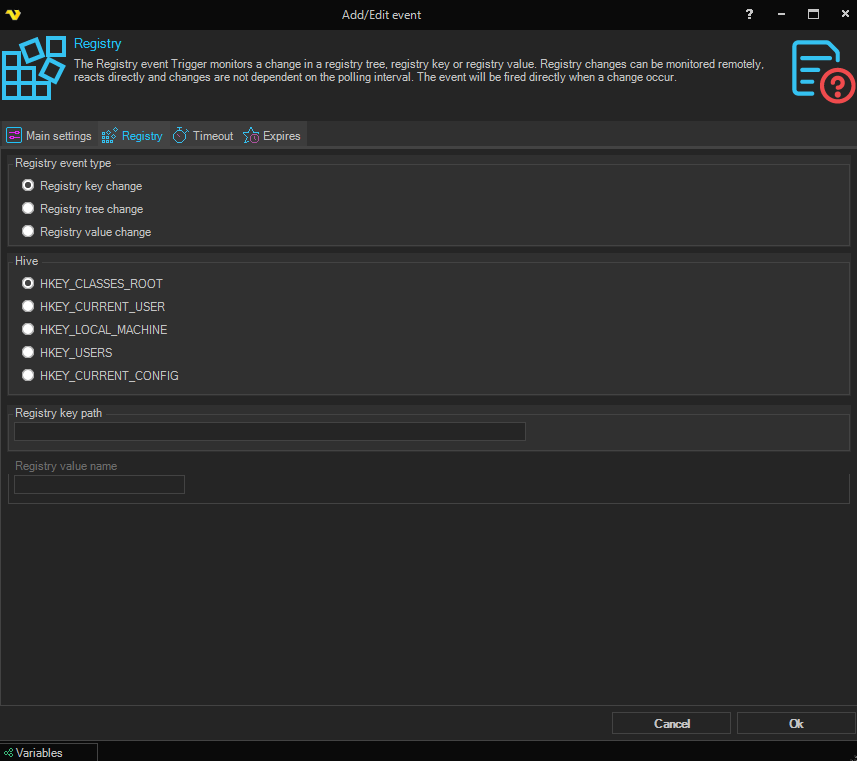
Registry event type
A group of radio buttons that controls how the registry is monitored:
- Registry key change — fires on changes to a specific key. The changes apply only to the key, not its sub keys
- Registry tree change — fires on changes to a key and its sub keys
- Registry value change — fires on changes to a single value of a specific key (default)
Hive
A group of radio buttons for selecting the registry hive that contains the key (or keys) being monitored:
- HKEY_CLASSES_ROOT
- HKEY_CURRENT_USER
- HKEY_LOCAL_MACHINE (default)
- HKEY_USERS
- HKEY_CURRENT_CONFIG
Registry key path
Path to the registry key. Use backspaces to separate trees. Do not start with a backspace. Registry Key
path example: "SOFTWARE\Microsoft\DirectX". Do not include the hive.
Registry value name
Name of the value in the registry key.
Example: "InstalledVersion" located in RegistryKeyPath: SOFTWARE\Microsoft\DirectX.
This field is only used when Registry value change is selected and is disabled when Registry key change or Registry tree change is selected.