Event Trigger - Slack
The Slack Event Triggers triggers on new messages in the Slack cloud. This Trigger is using the Slack Connection.
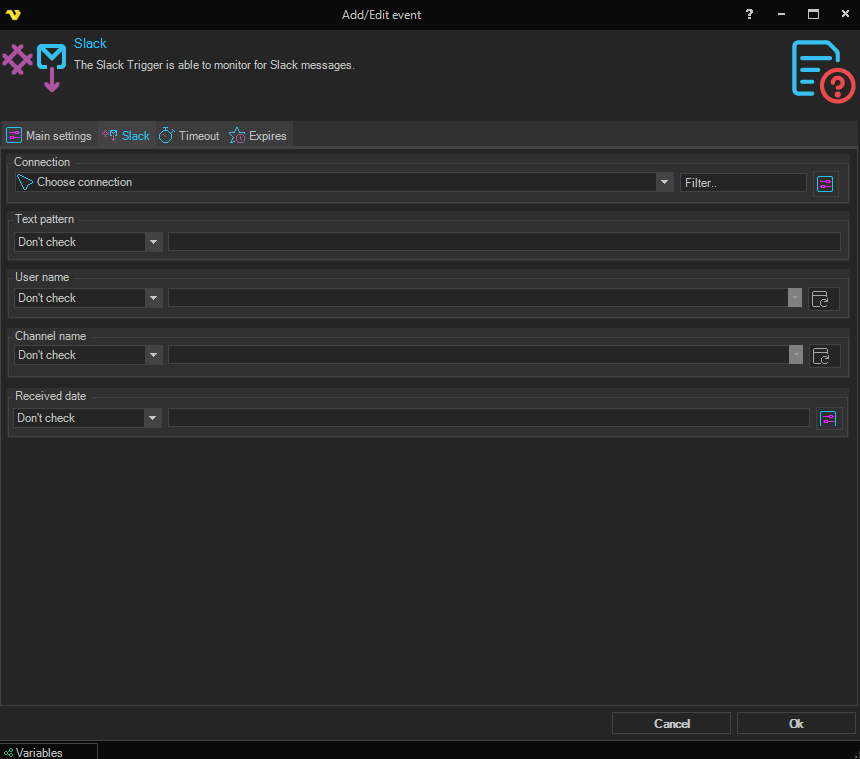
Each field below contains an operator dropdown and a value control. Setting the operator to Do not check disables that field; otherwise the value control is enabled and the field participates in the match. By default every field is set to Do not check.
Connection
Select a Slack Connection.
Text pattern
Match against the message text. Choose an operator and enter a value:
- Equal / Not equal — the message text must (or must not) match the value exactly
- Contains / Not contains — the message text must (or must not) contain the value
- Do not check — disables this condition
User name
Match against the sender of the Slack message. Choose an operator from the same set as Text pattern, then pick or type a user name in the dropdown. Click the Refresh button to populate the dropdown with users fetched from the selected Slack Connection.
Channel name
Match against the Slack channel the message was posted in. Choose an operator from the same set as Text pattern, then pick or type a channel in the dropdown. Click the Refresh button to populate the dropdown with channels fetched from the selected Slack Connection. Channels returned from the Slack API are prefixed with #.
Received date
Match against the date and time when the Slack message was received. The available operators are different from the text-based fields:
- Equal / Not equal — the received date must (or must not) match the supplied date exactly
- Larger / Larger or equal — the received date must be later than (or equal to) the supplied date
- Smaller / Smaller or equal — the received date must be earlier than (or equal to) the supplied date
- Do not check — disables this condition
Click the variables button next to the value field to insert a VisualCron date Variable.