Event Trigger - Network Change
The Network Change Trigger fires when a network adapter of the Server computer is connected or disconnected, or when its IP addresses change. It watches only the computer that runs the VisualCron Server; there is no remote option. Windows is checked every second, so Polling interval on Main settings is not used.
The settings are on the Network tab.
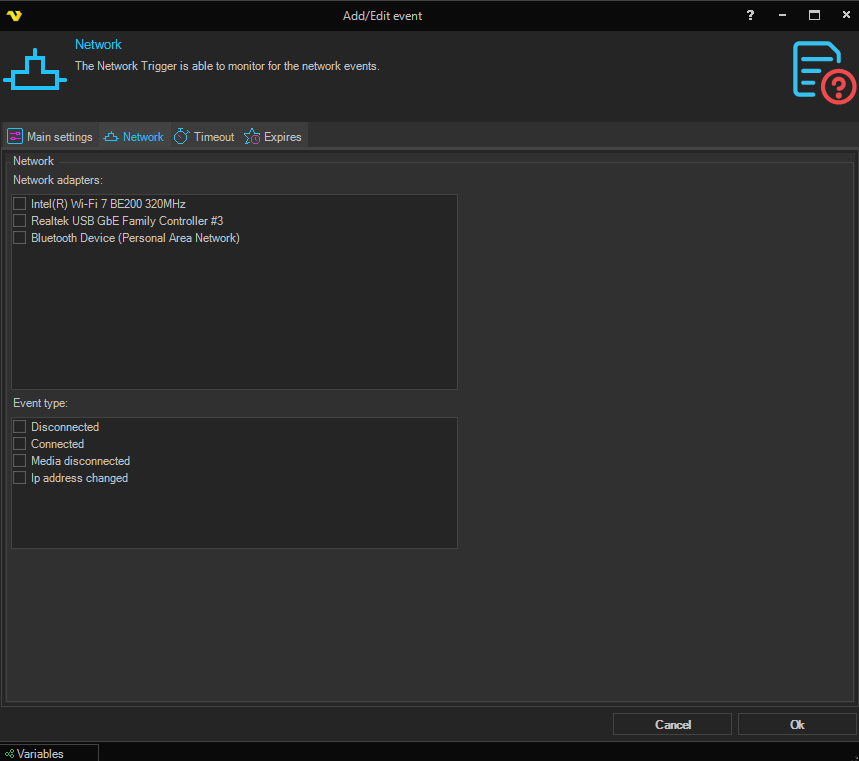
Network adapters
The network adapters of the Server computer. Check one or more adapters to watch; you must check at least one. The list is read when the VisualCron Server starts, so an adapter added later appears after a restart of the Server.
Event type
The changes that fire the Trigger. Check one or more; you must check at least one.
- Disconnected: the connection status of the adapter changes to disconnected
- Connected: the connection status of the adapter changes to connected
- Media disconnected: the network cable is unplugged or the media of the adapter is disconnected
- Ip address changed: the IP addresses of the adapter change
The Trigger counts every change that Windows reports for a selected adapter, including changes that match no selected event type. Run delay on Main settings and Expire after being triggered on Expires count these changes too. As a result, the Job can start sooner than set, and the Trigger can expire before it has fired. Leave Run delay at 1 and, if you need expiration, use Expiration date.
With Ip address changed, an adapter that has no IP address when the Trigger starts makes the Trigger fail when the adapter gets an address, and the Trigger is deactivated. Activate the Trigger again after the adapter has an address.
If VisualCron cannot connect to WMI on the Server computer, the Trigger is deactivated.
Result Variables
When the Trigger fires, it sets this result Variable:
Network status
The event that fired the Trigger: "Disconnected", "Connected", "MediaDisconnected" or "IpAddressChanged", {TRIGGER(Active|LastTrigger|Network.Result.NetworkStatus)}. In the Variables window, find it under the Job's Trigger, in Result. With Last trigger (Active|LastTrigger), the Variable reads the result of the firing that started the run. See Variables.