Event Trigger - AMQP
The AMQP Trigger receives messages from a queue on an AMQP 1.0 message broker, through an AMQP Connection. The Connection offers the broker types RabbitMQ and Azure Service Bus. Each message fires the Trigger once. Right after the Trigger fires, it accepts the message, which removes it from the queue, so other consumers of the queue do not get it.
The Polling interval on the Main settings tab is how many seconds the Trigger waits for a message in one receive call. A message that arrives during the wait is received right away.
This Trigger fires once per message and removes the message. If the run of the Job is skipped, for example because Do not start if job is already running is selected (the default), that message is lost. See Triggers that fire once per item in Event Triggers.
A message is also accepted, and so removed, when the Job does not start because of a time exception of the Job, or because Run after the trigger has been triggered in the Run delay group on the Main settings tab is above 1 and the message does not complete the count. Do not use a time exception or a run delay above 1 with this Trigger when every message must be processed.
With Expire after being triggered on the Expires tab, the message that makes the Trigger expire starts the Job but is not accepted, so the broker can deliver it again.
The settings are on the AMQP tab.
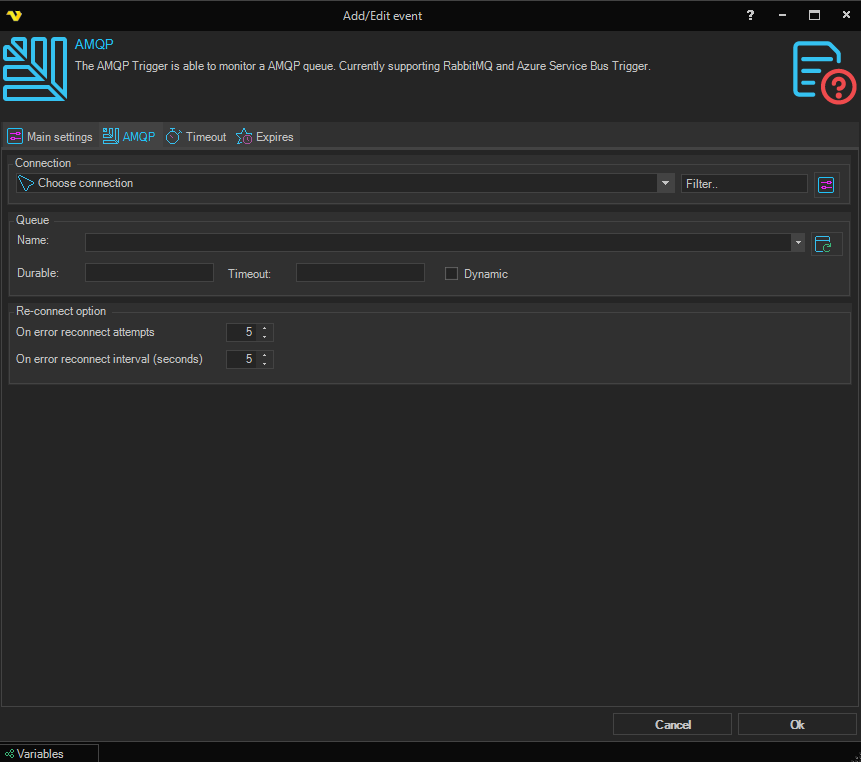
Connection
Select the AMQP Connection the Trigger uses to connect to the broker. A Connection is required.
If the Connection is deleted:
- When the Trigger starts without its Connection, it stops without an entry in the log but still shows as active
- While the Trigger runs, it keeps receiving until the link to the broker closes; it then tries to reconnect without a pause and writes "AMQP Trigger reconnect.." to the log on each attempt
In both cases, select another Connection, then deactivate and activate the Trigger.
Queue
Name
The name (address) of the queue to receive from. Click the refresh button to list the queues of the broker and select one, or type the name. For RabbitMQ, the list is read from the broker's management HTTP API at the Connection string of the Connection; when that is empty, the Connection's address and port are used. You can use Variables. A queue name is required.
Durable
The terminus durability to request for the receiving link, as a whole number. AMQP 1.0 defines "0" (none), "1" (configuration) and "2" (unsettled state). You can use Variables.
Timeout
How many seconds the broker keeps an expiring source (AMQP 1.0 source timeout), as a whole number. A value that is not a whole number is ignored. You can use Variables.
Dynamic
Check to ask the broker to create the source node dynamically (AMQP 1.0 dynamic source). The queue name is still sent and still required.
Leave Durable and Timeout empty and Dynamic cleared to use the broker's defaults.
If you enter a Timeout or check Dynamic, Durable must also contain a whole number. Otherwise the Trigger fails when it starts, with the error Durable: '' is not unsigned number, and is deactivated.
Re-connect option
On error reconnect attempts
Attempts in a row to re-establish the link to the broker after it was closed (1 to 500; default 5). Each attempt is written to the log. After that the Trigger stops receiving messages. If it still shows as active, deactivate and activate it.
The Trigger reconnects when the broker closes the link, including a forced close (amqp:connection:forced). Any other error while receiving stops the Trigger and deactivates it.
When the Trigger starts and the broker refuses the connection (an error that contains "No connection"), the Trigger keeps trying every On error reconnect interval seconds until the connection succeeds, and writes the error to the log on each attempt. These attempts continue after you deactivate the Trigger, until the connection succeeds. Any other error at start, for example a wrong user name or password, stops the Trigger and deactivates it.
On error reconnect interval (seconds)
The number of seconds to wait after a failed attempt before the next one (1 to 500; default 5).
Result Variables
In the Variables window, the result Variables are under the Job's Trigger, Result. In a run that this Trigger started, {TRIGGER(Active|LastTrigger|AMQP.Result.Message)} returns the text of the message that started the run. See Variables.
When the Trigger fires, it sets these result Variables:
AMQP.Result.Message: for a text body, the text; for a binary body, an encoded (Base64) form, not the raw bytesAMQP.Result.MessageString: for a binary body, the body decoded as text (with the character set of the content type or encoding, otherwise UTF-8); for a text body, the body in an XML formAMQP.Result.MessageId,AMQP.Result.CorrelationId,AMQP.Result.Subject,AMQP.Result.To,AMQP.Result.ReplyTo,AMQP.Result.ReplyToGroupId,AMQP.Result.GroupId,AMQP.Result.GroupSequence,AMQP.Result.UserId,AMQP.Result.ContentType,AMQP.Result.ContentEncoding: the message propertiesAMQP.Result.CreationTime|<date format>,AMQP.Result.AbsoluteExpiryTime|<date format>: the creation and expiry timeAMQP.Result.Durable,AMQP.Result.Priority,AMQP.Result.Ttl,AMQP.Result.FirstAcquirer,AMQP.Result.DeliveryCount: the message headerAMQP.Result.BodySection.Type: the type of the body sectionAMQP.Result.ApplicationProperties|<name>,AMQP.Result.DeliveryAnnotations|<name>,AMQP.Result.MessageAnnotations|<name>,AMQP.Result.Footer|<name>: the value of the entry with that name; without a name, the names of all entries, one per line
The date format is optional, for example {TRIGGER(Active|LastTrigger|AMQP.Result.CreationTime|yyyy-MM-dd HH:mm:ss)}.