Event Trigger - MSMQ
The MSMQ event trigger is able to monitor a private or public queue for new messages. When a new message arrives you can use VisualCron Variables to extract the information in the new message. To use this Trigger you need to setup a MSMQ Connection.
Triggers > Add > Event Trigger > MSMQ tab

Scope
Credential
Select a Credential if you are going to monitor a remote MSMQ queue. Click the Settings icon to populate the drop-down list with available credentials.
Local MSMQ / Remote MSMQ
Choose between the two radio options to monitor either a local or a remote MSMQ server:
- Local MSMQ — watch the queue on the same machine as the VisualCron Server
- Remote MSMQ — watch the queue on another machine. When selected, the Host name field below is enabled
Host name
The host name or IP address of the remote MSMQ server. The field is an editable dropdown populated with the available computers, so you can either pick from the list or type the host name directly. Enabled only when Remote MSMQ is selected.
Queue
Select the queue to be received. The queue field is an editable dropdown, so you can either pick from the list or type the queue path directly. Click the Refresh icon to populate the drop-down list of queues from the selected MSMQ server.
Troubleshooting:
Error: Retrieving the COM class factory for component with CLSID {1D9F85C0-9666-11D2-8927-0008C70C0622} failed due to the following error: 80040154 Class not registered (Exception from HRESULT: 0x80040154 (REGDB_E_CLASSNOTREG)).
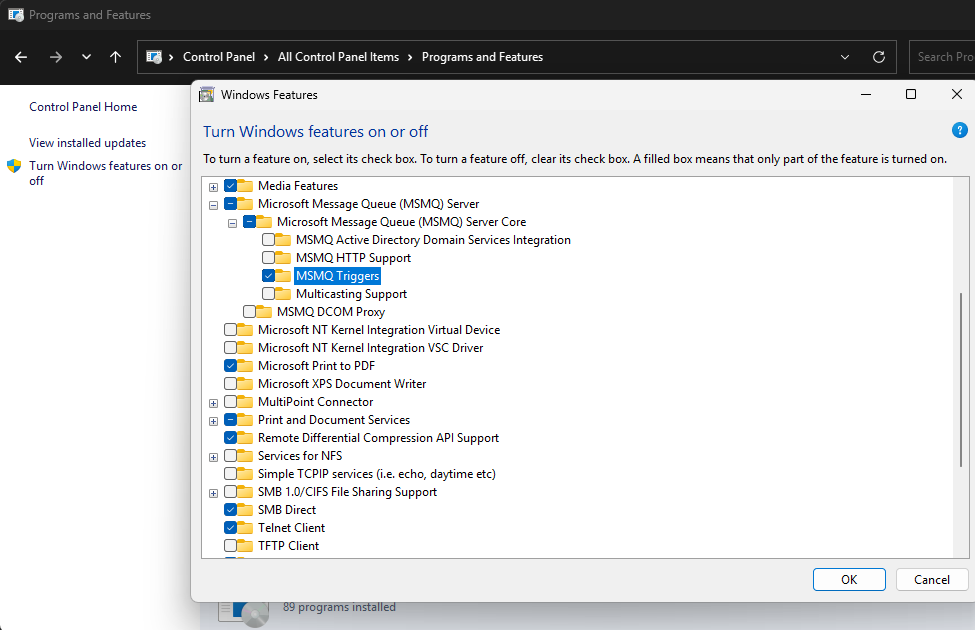
Make sure you have installed MSMQ Triggers in Programs and Features dialog: