MFT Server
The MFT Server event trigger monitors the internal MFT server for events. General creation and configuration of MFT server is made in MFT Server Settings.
Triggers > Add > Event Trigger > MFT Server > MFT event type sub tab
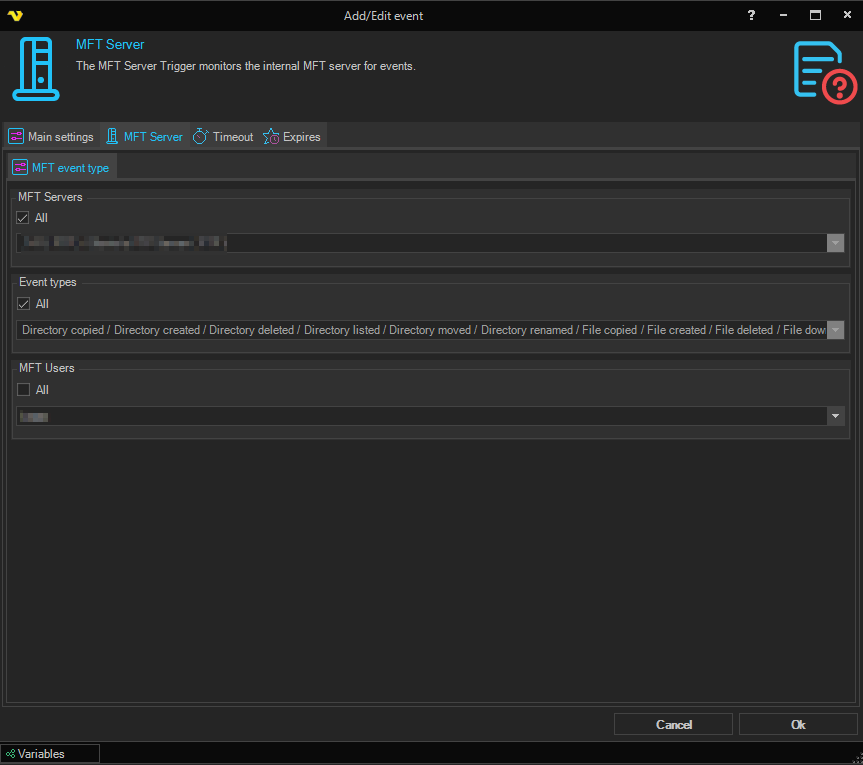
Each section below contains an All checkbox and a dropdown. Check All to match every value (the dropdown is then disabled), or uncheck it and pick a specific value from the dropdown to narrow the match.
MFT Servers
Select All to listen to every configured MFT endpoint, or uncheck All and pick a specific MFT server from the dropdown. Each entry in the dropdown shows the server name together with its protocol (for example FTP, SFTP, FTPS, or HTTP).
Event types
Select All to react to every MFT event, or uncheck All and pick a specific event type from the dropdown. Available event types cover directory operations (list, create, rename, move, delete, copy), file operations (create, rename, move, delete, copy), uploads (started, completed, failed), downloads, authentication (login success/failure), sessions (connect, connect failure, disconnect), user management (create, update, delete, enable, disable), and server state (started, stopped, activated, deactivated, error).
MFT Users
Select All to match events from any MFT user, or uncheck All and pick a specific MFT user from the dropdown.