Event Trigger - Printer
The Event Trigger - Printer Trigger lets you monitor a printer for events within the spooler.
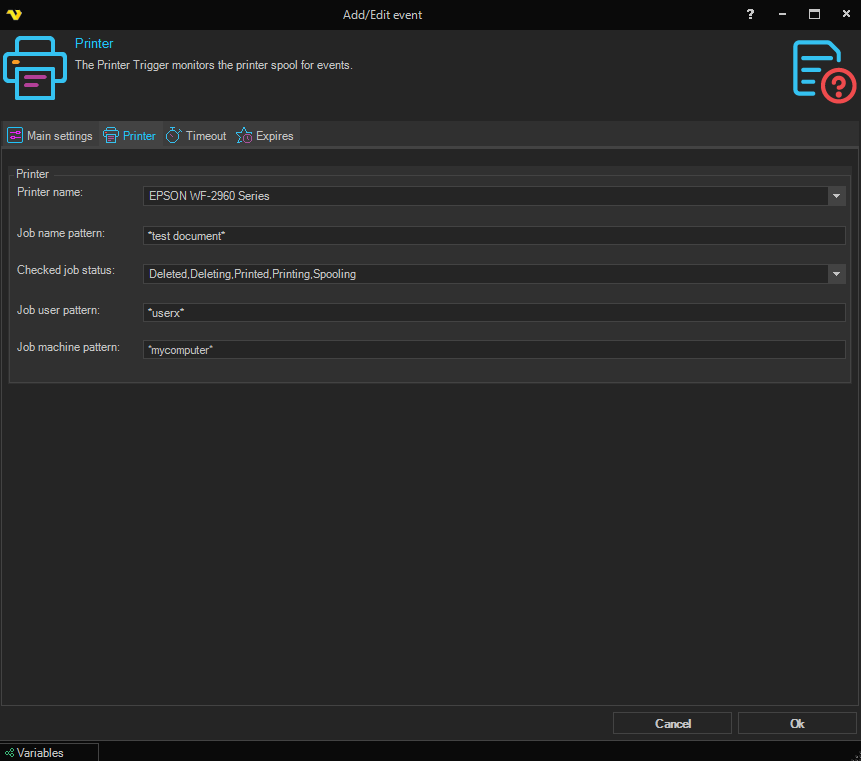
Printer
Printer name
A dropdown of the printers available on the VisualCron Server. Select the printer whose spooler should be monitored. A printer must be selected.
Job name pattern
Mask for the job name from the printer queue.
Checked job status
A multi-select checkbox dropdown of the print job statuses that the Trigger should react to. The following statuses are available:
- Paused
- Error
- Deleting
- Spooling
- Printing
- Offline
- PaperOut
- Printed
- Deleted
- Blocked_DEVQ
- UserIntervention
- Restart
- Complete
- Retained
- RenderingLocally
By default, Spooling, Printing, Printed, Deleting, and Deleted are selected.
Job user pattern
Mask for the user who sent the document for printing.
Job machine pattern
Mask for the name of the computer from which the document was sent to print and on which the user is working from the previous element.