Event Trigger - VisualCron
The VisualCron event trigger watches internal processes of VisualCron. This Trigger subscribes on internal events, like when a Job has started or has been completed. Events that are happening in VisualCron are immediately caught by this event type. It is possible to monitor a local or remote Server instance.
Triggers > Add > Event Trigger > VisualCron tab
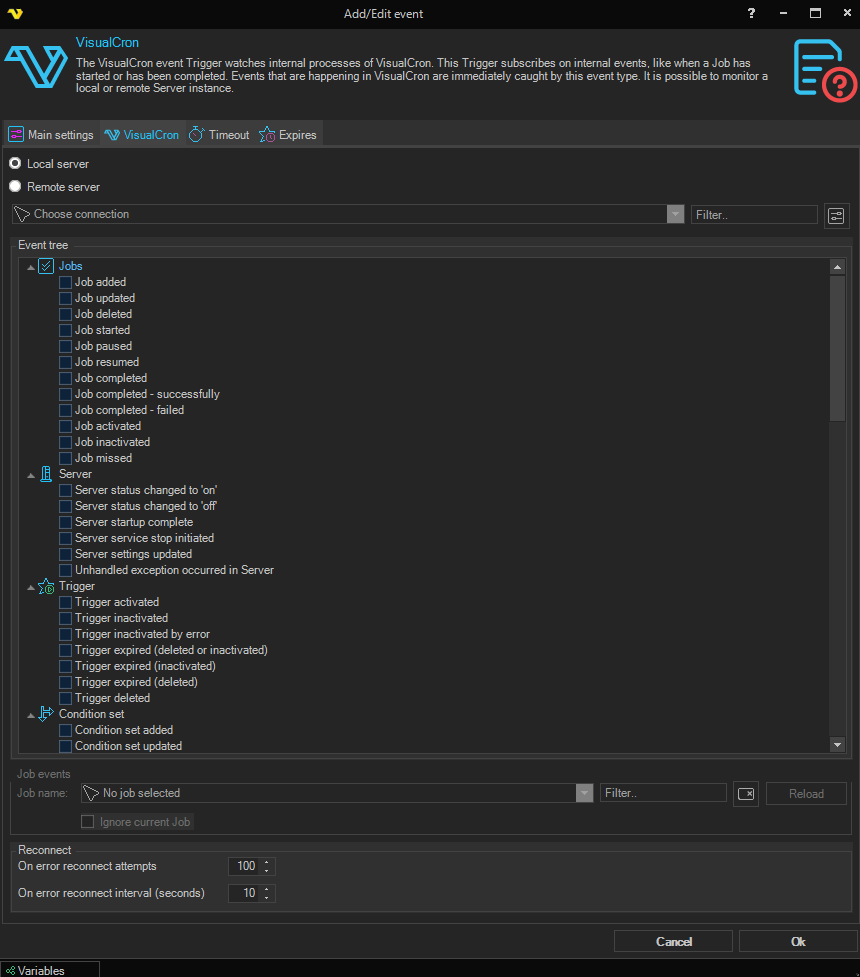
Local server / Remote server
A pair of radio buttons that select which VisualCron Server the Trigger should listen on:
- Local server — listen for events on the current VisualCron Server (default)
- Remote server — listen for events on a remote VisualCron Server. When selected, the VisualCron Connection picker below becomes editable so that the remote server can be selected
Job filter
The Job filter section is only relevant for events in the Jobs category. It lets you limit which Jobs the Trigger reacts to.
Job name
A multi-select Job picker. Tick one or more Jobs that the Trigger should react to. Click the Reload button next to the picker to refresh the list of Jobs from the selected Server.
Ignore current Job
When checked, the Trigger will not fire for events that involve the Job that owns this Trigger. This prevents infinite loops where a Job's own events would cause itself to run again.
On error reconnect attempts
The number of times VisualCron tries to reconnect when the event subscription is lost (typically when watching a Remote server and the network drops). Value 1 to 500 is available. Default value is 5 times.
On error reconnect interval (seconds)
The number of seconds to wait between reconnect attempts. Value 1 to 500 is available. Default is 5 seconds.
VisualCron Events
Events are shown in a hierarchical tree with checkboxes. Tick the checkbox next to each event you want to react to. A category checkbox toggles all events in that category. The available categories and events are listed below.
Jobs
Job added — fires when a Job is added.
Job updated — fires when an existing Job is updated.
Job deleted — fires when a Job is deleted.
Job started — fires when a Job starts executing.
Job paused — fires when a Job is paused.
Job resumed — fires when a Job is resumed after being paused.
Job completed — fires when the Job completes either successfully or with failure.
Job completed - successfully — fires when the Job completes with success.
Job completed - failed — fires when the Job completes with failure.
Job activated — fires when a Job is activated.
Job inactivated — fires when a Job is deactivated.
Job missed — fires when the Job missed a Trigger according to schedule because the Server was down or similar.
Server
Server status changed to 'on' — fires when the Server's status changes to on.
Server status changed to 'off' — fires when the Server's status changes to off.
Server startup complete — fires when the Server has finished its startup sequence.
Server service stop initiated — fires when a stop of the Server service has been initiated.
Server settings updated — fires when the Server's settings have been updated.
Unhandled exception occurred in Server — fires when an unhandled exception occurs inside the Server.
Trigger
Trigger activated — fires when a Trigger is activated.
Trigger inactivated — fires when a user or other activity deactivates the Trigger.
Trigger inactivated by error — fires when a Trigger fails monitoring something, i.e. if the Connection fails too many times.
Trigger expired (deleted or inactivated) — fires when Expiration is enabled and the Expire action is any reason.
Trigger expired (inactivated) — fires when Expiration is enabled and the Expire action is Inactivate Trigger.
Trigger expired (deleted) — fires when Expiration is enabled and the Expire action is Delete Trigger.
Trigger deleted — fires when the Trigger is deleted.
Condition set
Condition set added — fires when a Condition set is added.
Condition set updated — fires when a Condition set is updated.
Condition set deleted — fires when a Condition set is deleted.
Condition set not found — fires when a referenced Condition set cannot be found.
Connections
Connection added — fires when a Connection is added.
Connection updated — fires when a Connection is updated.
Connection deleted — fires when a Connection is deleted.
Connection not found — fires when a referenced Connection cannot be found.
Connection failed — fires when a Connection fails (for example, authentication or network error).
Credentials
Credential added — fires when a Credential is added.
Credential updated — fires when a Credential is updated.
Credential deleted — fires when a Credential is deleted.
Credential not found — fires when a referenced Credential cannot be found.
Notifications
Notification added — fires when a Notification is added.
Notification updated — fires when a Notification is updated.
Notification deleted — fires when a Notification is deleted.
Notification not found — fires when a referenced Notification cannot be found.
Users
User added — fires when a User is added.
User updated — fires when a User is updated.
User deleted — fires when a User is deleted.
User logon — fires when a User logs on.
Load balancing
Events related to the VisualCron Load Balancing engine:
- LB condition is met — fires when a load‑balancing condition evaluates to true
- LB action performed — fires when a load‑balancing action is performed
- LB broker turned on — fires when the LB broker is started
- LB broker turned off — fires when the LB broker is stopped
- LB broker unhandled exception — fires when an unhandled exception occurs in the LB broker
- LB agent connected — fires when an LB agent connects
- LB agent disconnected — fires when an LB agent disconnects
- LB agent not available — fires when an LB agent becomes unavailable