Event Trigger - SQS
Amazon Simple Queue Service (SQS) is a fully managed message queuing service that enables you to decouple and scale microservices, distributed systems, and serverless applications. SQS eliminates the complexity and overhead associated with managing and operating message oriented middleware, and empowers developers to focus on differentiating work. Using SQS, you can send, store, and receive messages between software components at any volume, without losing messages or requiring other services to be available. Get started with SQS in minutes using the AWS console, Command Line Interface or SDK of your choice, and three simple commands.
The Amazon SQS Trigger in VisualCron is using the Amazon Connection.
Amazon SQS Trigger settings
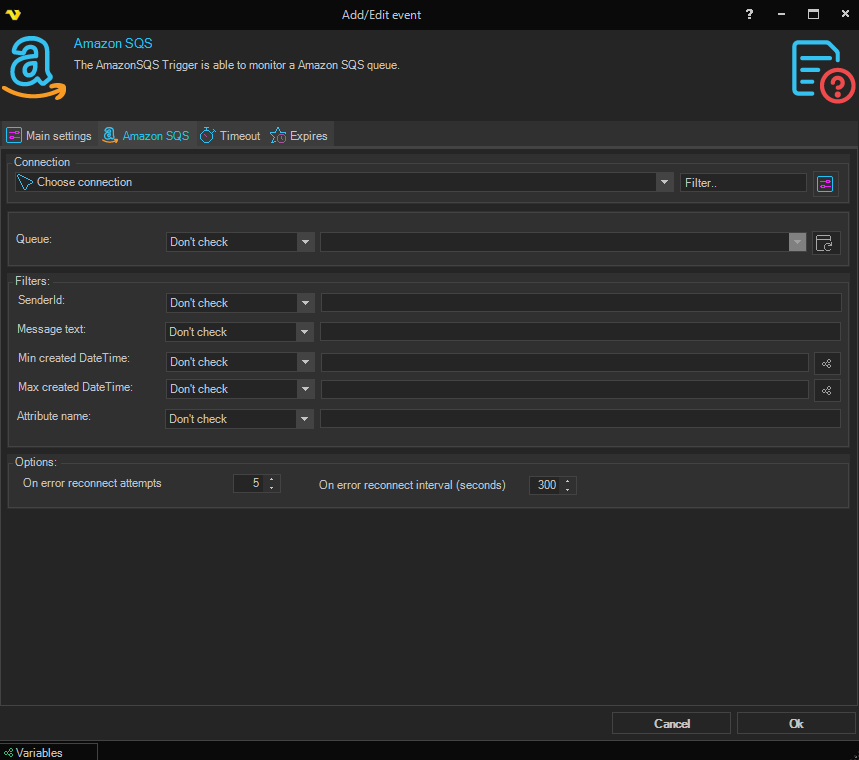
Connection
Select the Amazon Connection that the trigger should use to authenticate against AWS.
Queue
A multi-select dropdown of available SQS queues. Click the Refresh button next to it to fetch queues from the selected Amazon Connection, then tick one or more queues. Selected queues are stored as a comma-separated list. Use the operator dropdown above the field to control matching:
- Contains / Not contains — the queue name must (or must not) contain the supplied text
- Equal / Not equal — the queue name must (or must not) match exactly
- Do not check — disables this filter and watches all queues
Options
On error reconnect attempts
The number of times VisualCron tries to reconnect to SQS when an error occurs. Value 1 to 500 is available. Default value is 5 times.
On error reconnect interval (seconds)
The number of seconds to wait between reconnect attempts. Value 1 to 500 is available. Default is 5 seconds.
Filters
Each text-based filter field below has its own operator dropdown next to the value field. Setting the operator to Do not check disables the filter and matches all messages.
Message text
Filter on message text. Available operators: Contains, Not contains, Equal, Not equal, Do not check.
SenderId
Filter on the SQS SenderId of the message. Available operators: Contains, Not contains, Equal, Not equal, Do not check.
Attribute name
Filter on the name of a message attribute. Available operators: Contains, Not contains, Equal, Not equal, Do not check.
Min created DateTime
Filter on the minimum created date and time. The operator dropdown supports date comparisons: Equal, Not equal, Larger, Larger or equal, Smaller, Smaller or equal, Do not check. Click the variables button next to the value field to insert a VisualCron date Variable.
Max created DateTime
Filter on the maximum created date and time. The operator set is the same as Min created DateTime above. Click the variables button next to the value field to insert a VisualCron date Variable.