Event Trigger - Powershell
The PowerShell Trigger is able to execute an existing PowerShell file or PowerShell script on the fly and then monitor the resulting output.
Triggers > Add > Event Trigger > PowerShell > PowerShell tab > Trigger sub tab
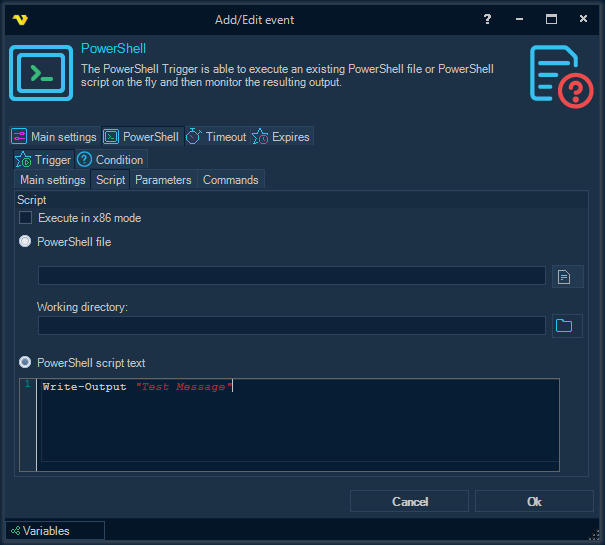
Inside the Trigger sub tab there are four inner tabs: Main settings, Script, Parameters and Commands. The composition and purpose of all the parameters that are available in the inner tabs fully corresponds to the description of the parameters from the topic, which describes the PowerShell Task.
PowerShell tab > Condition sub tab
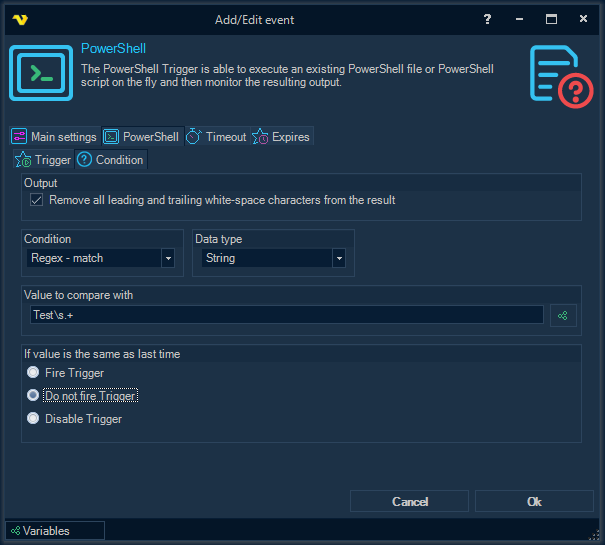
Output
Remove all leading and trailing white-space characters from the result
All leading and trailing white-space characters are removed from the PowerShell script output before the condition is checked. This option is enabled by default.
Data type
Select the data type that the PowerShell script result should be interpreted as. The available comparison methods in the Condition dropdown change depending on the selected data type:
- String
- Boolean
- Int32
- Int64
- Decimal
- Double
Condition
Select the comparison method that should be applied between the result and the Value to compare with. The list of available methods depends on the selected Data type:
- Boolean — Equal, Not equal
- String — Equal, Not equal, Contains, Not contains, RegEx match, RegEx no match
- Int32 / Int64 / Decimal / Double — Equal, Not equal, Larger, Larger or equal, Smaller, Smaller or equal, Contains
Value to compare with
Enter a value/Variable to compare the result with. Click the Variables icon to open the the Variables list.
If value is the same as last time
Choose how the Trigger should behave when the new result matches the previous result:
- Fire Trigger — fire the Trigger every time the Condition is met (default)
- Do not fire Trigger — skip firing when the result is the same as last time
- Disable Trigger — disable the Trigger after a repeated identical match
PowerShell Trigger Result Variables
MatchedValue
The string representation of the matched value from the PowerShell script output.