Task Amazon EC2 - Launch Instance
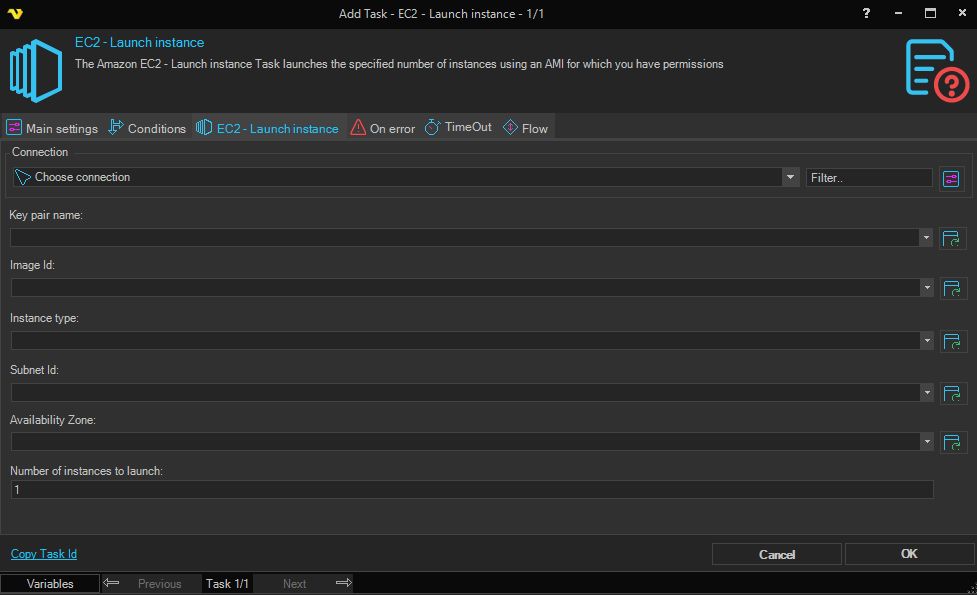
The Amazon EC2 - Launch instance Task launches one or more new Amazon EC2 instances from an Amazon Machine Image (AMI) that you have permission to use, using an Amazon Connection.
The Main settings, Flow, On error, Conditions and TimeOut tabs are the same for every Task; see Job - Tasks.
EC2 - Launch instance tab
- Connection: the Amazon Connection to use; see Connection - Amazon. Click the button next to the list to manage Connections. The Client asks you to select a Connection before it saves the Task
- Key pair name: the name of the key pair for the new instances. Click the refresh button to fill the list
- Image Id: the ID of the machine image (AMI) to launch. Click the refresh button to fill the list
- Instance type: the size of the instances to launch. Click the refresh button to fill the list with the types that the selected image supports
- Subnet Id: the ID of the VPC subnet to launch the instances into. Click the refresh button to fill the list
- Availability Zone: the zone to launch the instances in. Click the refresh button to fill the list
- Number of instances to launch: how many instances to launch from the image. Default: "1". It must be a number, or the Task fails; a decimal is rounded to a whole number
All fields accept Variables.
Output and errors
For each reservation that Amazon returns, the Task writes one line to the Task output, with these values separated by |: the owner (AWS account) ID, the reservation ID, the availability zone, the image ID, the number of instances, the key pair name, the subnet ID and the instance type.
When the Connection cannot be found, or Amazon returns an error, the Task fails. To change how the Task responds to errors, see Task - On error.