Task Azure - Create VM
The Azure - Create VM Task creates a new virtual machine in the Azure cloud. This Task is using the Microsoft Azure Connection.
Azure - Create VM tab
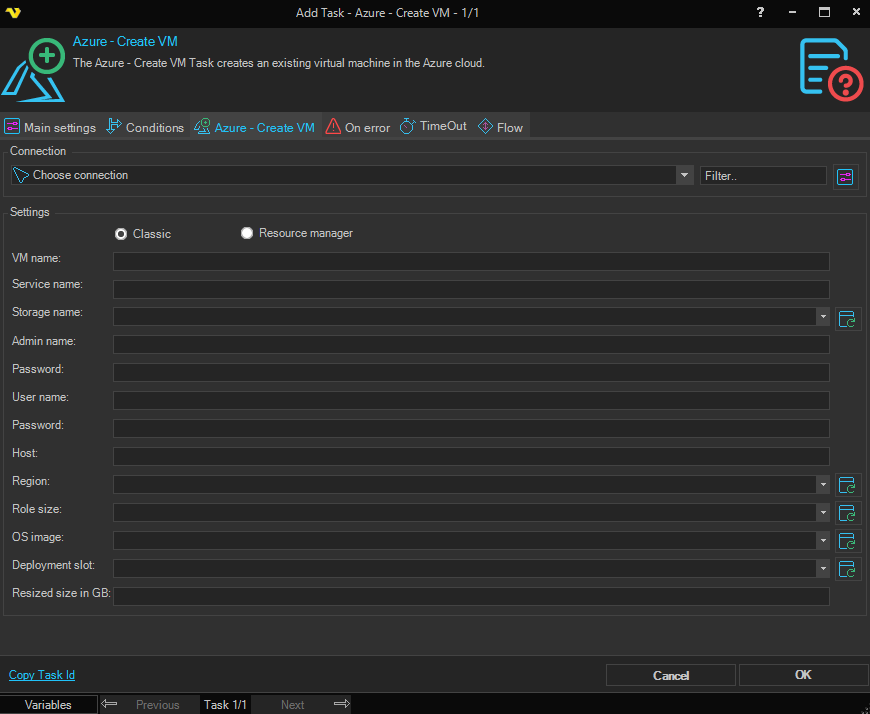
Connection
To use the Azure Tasks you need to create a Connection first. Click the Settings icon to open the Manage Connections dialog.
Type
Select the deployment model to use for the new virtual machine. Available options:
- Classic - create the virtual machine using the classic deployment model
- Resource Manager - create the virtual machine using Azure Resource Manager
The labels of several fields below change to match the selected Type.
VM name
The name to assign to the new virtual machine.
Service name / Resource group
The Azure service name (when Type is set to Classic) or the resource group (when Type is set to Resource Manager) in which the virtual machine will be created.
Storage name / Availability set
The Azure storage account that will host the virtual machine's disks (when Type is set to Classic) or the availability set the virtual machine should join (when Type is set to Resource Manager). Click the Refresh icon to populate the drop-down list.
Region
The Azure region in which to create the virtual machine. Click the Refresh icon to populate the drop-down list.
Role size
The size of the virtual machine to create. Click the Refresh icon to populate the drop-down list with sizes available in the selected Region.
OS image
The operating system image to deploy. Click the Refresh icon to populate the drop-down (Classic) or to open the image search dialog (Resource Manager).
Deployment slot / Disk type
The deployment slot for the virtual machine (when Type is set to Classic) or the disk type (when Type is set to Resource Manager). Click the Refresh icon to populate the drop-down list.
Admin name
The administrator user name for the new virtual machine.
Admin password
The administrator password for the new virtual machine.
User name
The standard user name to create on the new virtual machine.
User password
The standard user password to create on the new virtual machine.
Host
The host name to assign to the new virtual machine.
Size
The size of the virtual machine's disk, in gigabytes. Must be an integer.