Task Database - Execute SSISDB Package
The Task Database - Execute SSISDB package executes an existing package from the catalogs (SSISDB).
Execute SSISDB package tab
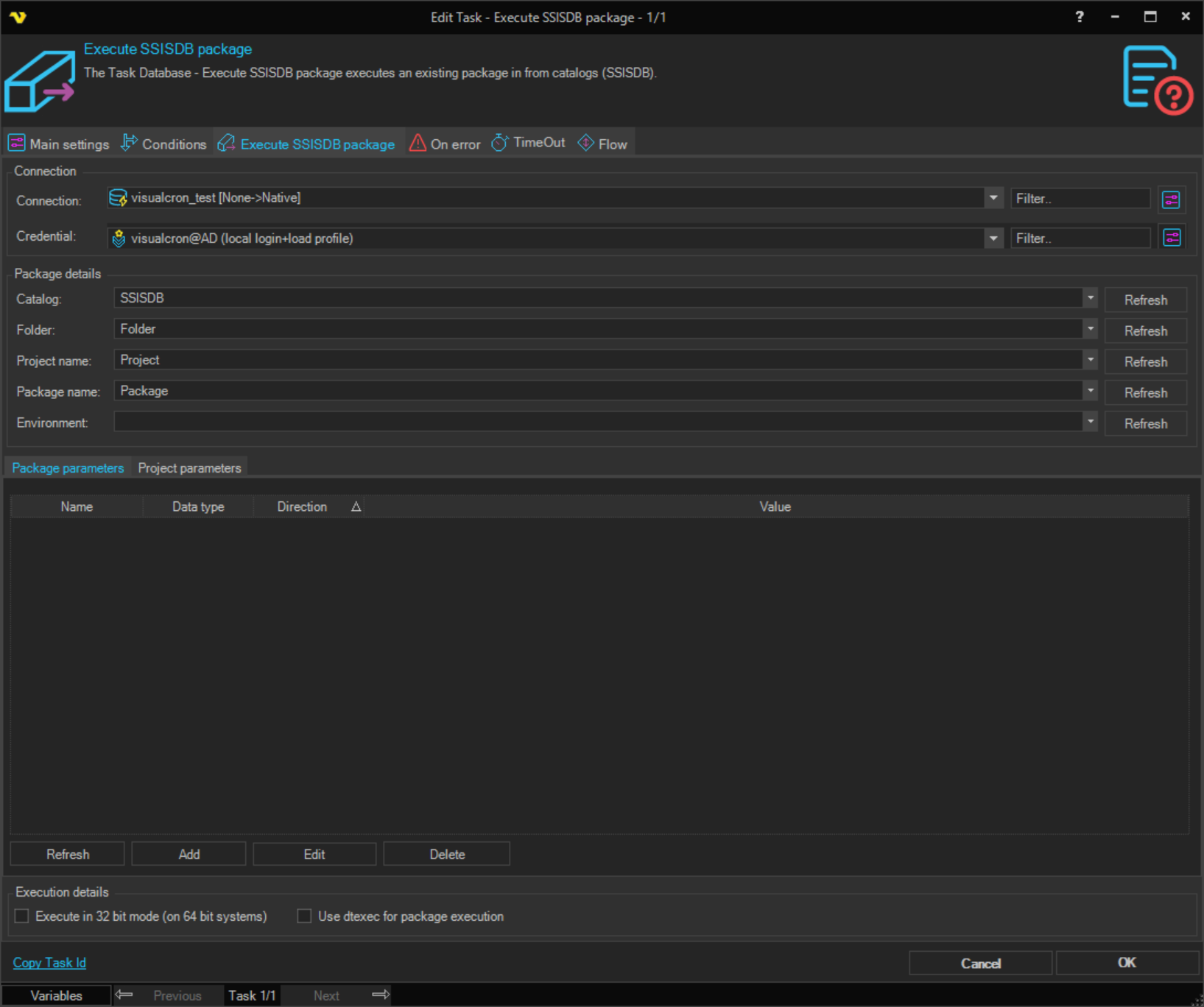
Connection
Select the SQL Connection to the SSISDB server. You must create a Connection first in the Connections dialog.
Credential
Optional credential for executing the package. When using Windows authentication, the Credential must be a valid Windows user with permissions to execute packages in SSISDB.
Package details
Catalog
The SSISDB catalog name. Click the Refresh button to populate the list from the server.
Folder
The folder within the catalog that contains the project. Click the Refresh button to populate the list.
Project name
The name of the SSIS project. Click the Refresh button to populate the list.
Package name
The name of the package to execute within the project. Click the Refresh button to populate the list.
Environment
Optional environment reference to use when executing the package. Click the Refresh button to populate the list.
Execution details
Use dtexec for package execution
When enabled, VisualCron uses the dtexec.exe command-line utility to execute the SSIS package instead of the Catalog API. This provides an alternative execution method with several benefits:
- Process isolation: Package execution runs in a separate process, reducing impact on the VisualCron service
- Compatibility: Better compatibility with certain package types and legacy SQL Server installations
- Troubleshooting: Easier to debug through standard command-line output
- Resource management: Better suited for long-running packages or resource-constrained environments
When disabled (default), packages are executed using the SQL Server Integration Services Catalog API through .NET Management Objects.
When using dtexec.exe for package execution, empty string parameter values cannot be processed and will result in error code 6 (internal error). Ensure all string parameters have non-empty values, or use the Catalog API execution mode (uncheck this option) which supports empty string values.
Execute in 32 bit mode (on 64 bit systems)
When checked, the package is executed in 32-bit mode. This is commonly needed when the package uses 32-bit drivers or components.
Package parameters tab
A grid listing the parameters for the selected package. Columns show Name, Value, Direction, and Data type. Use the Add, Edit, Delete, and Refresh buttons to manage parameters.
Project parameters tab
A grid listing the parameters for the selected project. Columns show Name, Value, Direction, and Data type. Use the Add, Edit, Delete, and Refresh buttons to manage parameters.
- SQL Server Integration Services must be installed on the machine where VisualCron is running
- For dtexec.exe execution mode, the SQL Server client tools must be installed on the VisualCron server
- When using trusted connections, you may need to specify a Credential with appropriate permissions to execute packages in SSISDB
- The SSISDB catalog must be created and configured on the target SQL Server instance
Troubleshooting
Error code 6: Internal error when using dtexec
This error occurs when empty string parameter values are passed to dtexec.exe.
Solution:
- Check all string parameters and ensure they have non-empty values, or
- Uncheck "Use dtexec for package execution" to use Catalog API mode
Cannot locate dtexec.exe
This error indicates that dtexec.exe could not be found on the system.
Solution:
- Verify SQL Server Integration Services is installed on the VisualCron server
- Check that SQL Server client tools are installed
- Use Catalog API mode (uncheck "Use dtexec for package execution") which does not require dtexec.exe
Package execution fails with "Could not load file or assembly" error
Solution:
- Enable "Execute in 32 bit mode" if your package uses 32-bit components
- Verify all package dependencies are installed on the VisualCron server