Task Database - BigQuery - Run Query
The Google BigQuery - Query Task runs a query against Google BigQuery public or private dataset.
The BigQuery Tasks require the Google Cloud Connection.
Connection
Select the Google Cloud Connection to use for this Task.
Source tab
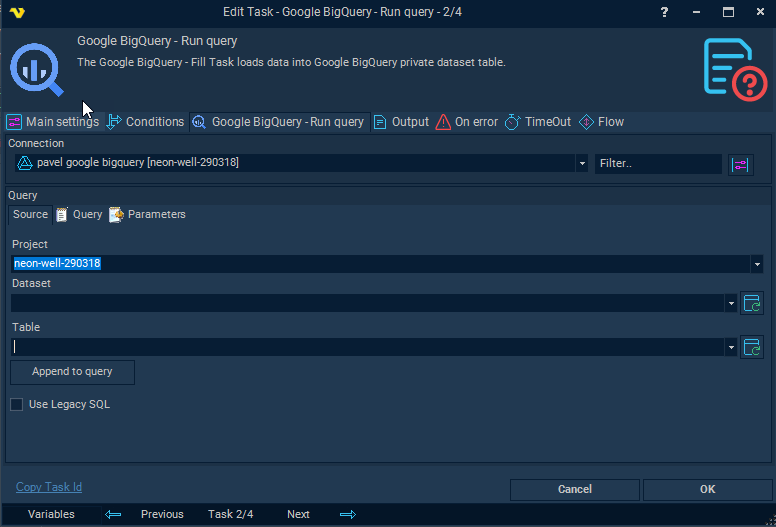
The Source tab is a browser for exploring projects, datasets, and tables. Use it to locate a specific table and append a starter query to the Query tab. The Dataset and Table selections on this tab are not saved when the Task saves.
Project
The project name from the selected connection, or bigquery-public-data to browse publicly available datasets.
Dataset
Datasets within the selected project. Click Refresh to populate the list.
Table
Tables within the selected dataset. Click Refresh to populate the list.
Dataset and Table fields are not saved when Task saves
Append to query
When clicked, generates an initial SELECT query using the selected Project, Dataset, and Table and appends it to the Query tab:
SELECT * FROM `project.dataset.table` LIMIT 1000
Use Legacy SQL
When checked, Legacy SQL mode is used when executing the query. When unchecked (default), Standard SQL is applied.
Query tab
Enter the SQL query to run against BigQuery. The editor supports SQL syntax highlighting. Standard SQL is used by default; enable Use Legacy SQL on the Source tab to switch modes.
Parameters tab
Parameters type
Select Named parameters to reference parameters by name in the query (e.g. @name), or Position parameters to reference them by position (e.g. ?).
The grid lists all defined parameters with columns: Name, Data type, Item data type, Value, and Is Null. Use the Add, Edit, and Delete buttons to manage parameters.
When adding or editing a parameter:
Name
The parameter name, referenced in the query using the @name syntax when using named parameters.
Data type
The BigQuery data type of the parameter. Supported types are: Array, Bool, Bytes, Date, DateTime, Float64, Geography, Int64, Numeric, String, Struct, Time, and Timestamp.
Item data type
The data type of each element within an Array parameter. Only active when Data type is set to Array.
Value
The value to pass for the parameter. Supports Variables.
Use null value
When checked, the parameter is passed as NULL regardless of the Value field.