Task Database - Execute DTS Package
This Task lets you execute local DTS packages. VisualCron must reside on the server machine to be able to execute this Task. To execute remote DTS packages you can use the SQL Task and type Job.
Execute DTS package tab
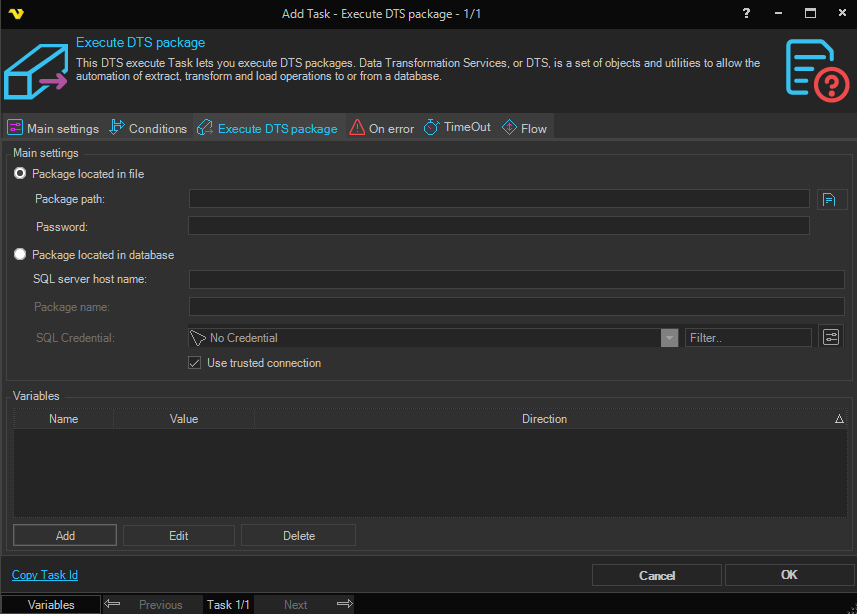
Package located in file
Specify the full path to the file.
Password
The password for the DTS package file, if it is password protected.
Package located in database
If the package is located in a SQL Server database, specify the server hostname and package name.
SQL server host name
The hostname or IP address of the SQL Server where the package is stored.
Package name
The name of the DTS package stored in the database.
SQL Credential
When using a Trusted connection this should be a Windows user that have access to the SQL server. Use Load profile option in the Credential. The domain name must be the DNS name or IP of the SQL server. Click the Settings icon to open the Manage credentials dialog.
When not using a Trusted connection this should be the username and password of the SQL Server. The domain name must be the DNS name or IP of the SQL server.
Use trusted connection
Check this if you want to impersonate as a Windows user to access database instead of using SQL Server credentials.
Variables
If the package needs variables you enter them here. Click Add to add a new variable, Edit to modify a selected variable, or Delete to remove one.