Task Internal - Calculate Variable
The Calculate Variable Task lets you use different kind of math operations to modify and existing Variable.
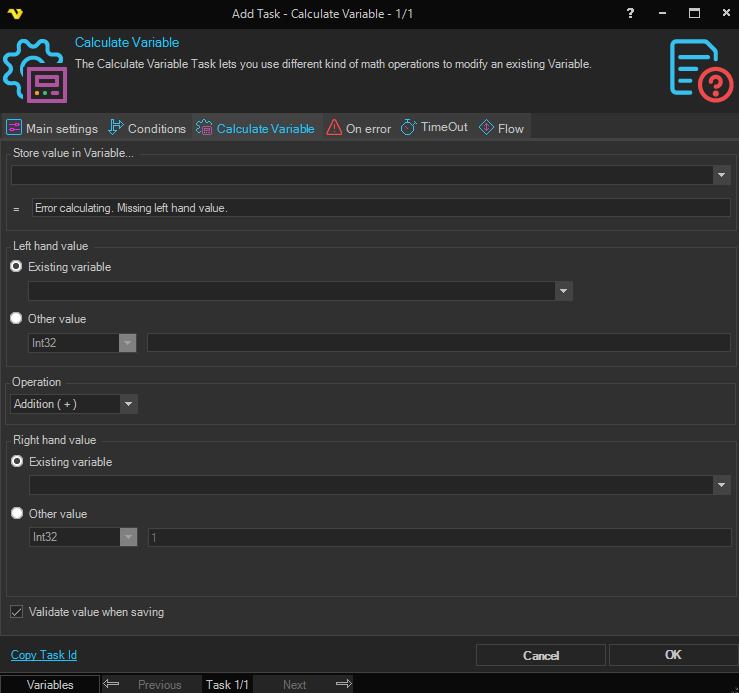
Store value in Variable...
First you select an existing Variable to store the new value in.
Result box
Here you can preview the future value of the next calculation.
Left hand value
Existing variable / Other value
Select whether to use an existing variable or enter another value for the left side of the calculation. Defaults to Existing variable.
Right hand value
Existing variable / Other value
Select whether to use an existing variable or enter another value for the right side of the calculation. Defaults to Other value.
By combining different settings you have the following choices:
- VariableX = VariableY (math operation) VariableZ
- VariableX = VariableX (math operation) Value1
- VariableX = VariableY (math operation) Value1
- VariableX = Value1 (math operation) VariableX
- VariableX = Value1 (math operation) VariableY
- VariableX = Value1 (math operation) Value2
Operation
The following math operations are available: Addition, Subtraction, Multiplication and Division
Validate value when saving
If checked, VisualCron will validate the value with the value type. Leave not checked if you are using a Variable as value and the Variable is not yet set.