Task Internal - Set User Variable
The Set User Variable Task creates or updates a User Variable. User Variables are global: they can be used anywhere in VisualCron with {USERVAR(<name>)}, and they are saved on the Server, so they are kept after a restart.
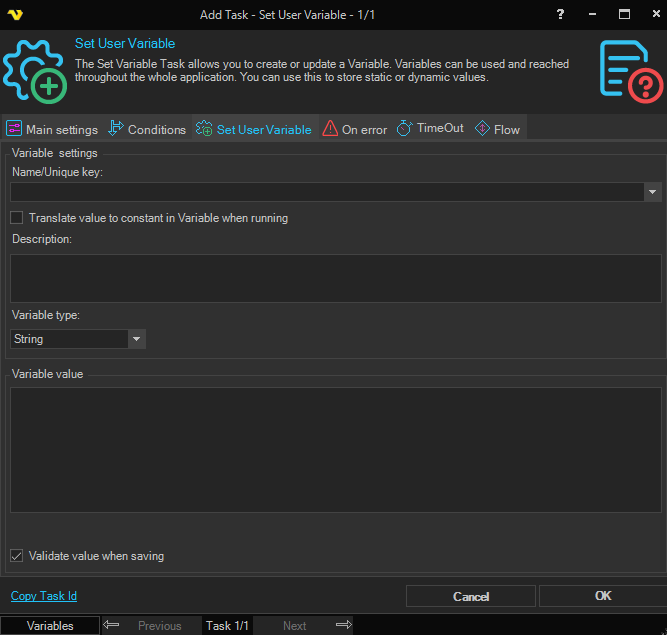
Variable settings
Name/Unique key
Select an existing User Variable, or type a new name to create one; Variables can be used in the name. For an existing Variable, its value and type are loaded, and the type cannot be changed: the Task cannot be saved with another type, and if, when the Task runs, the Variable has a different type, the Task fails. A name built from Variables is checked only when the Task runs.
Translate value to constant in Variable when running
Available for every type except List; cleared by default. For String Variables, when cleared, the value is stored as written, including any Variables in it; when selected, the Variables are replaced each time the Task runs, and the result is stored. For Int32, Double and Boolean Variables, Variables in the value are always replaced when the Task updates an existing Variable; when it creates the Variable, they are replaced only if this option is selected, and otherwise the expression is stored and replaced each time the Variable is read.
Description
Optional. Used only when the Task creates the Variable; an existing Variable keeps its description.
Variable type
String (default), Int32, Double, Boolean or List. For List, the value is entered in a grid. Choose the type that matches how the Variable is used; for example, the Calculate Variable Task works only with Int32 and Double Variables.
Variable value
The value to set.
Validate value when saving
This option is selected again each time you open the Task. For Int32, Double and Boolean, it checks that the value converts to the type; String and List values are not checked. For Int32, Double and Boolean, clear it when the value contains a Variable, which always fails the check.
Result
The output says whether the Variable was added or updated, with its value.
When a user starts the Job, from the Client or through a Job/Task Control Task in a Job that user started, and is still connected when this Task runs, the change is saved and shown in Clients only if that user has the Add permission (new Variable) or the Edit permission (existing Variable) for Variables (see User permissions). Without the required permission, the Task still succeeds and its output still says the Variable was added or updated, but a new Variable is not created, and an existing one gets the new value on the Server only: Clients do not show it, and it is written to disk only the next time User Variables are saved; if the VisualCron service restarts before then, the new value is lost. Runs started by a Trigger are not affected. Give users who run this Job from the Client both permissions.