Task Internal - Set Job Variable
The Set Job Variable Task creates or updates a Variable in a Job's Job Variables. Job Variables belong to the Job and are exported with it.
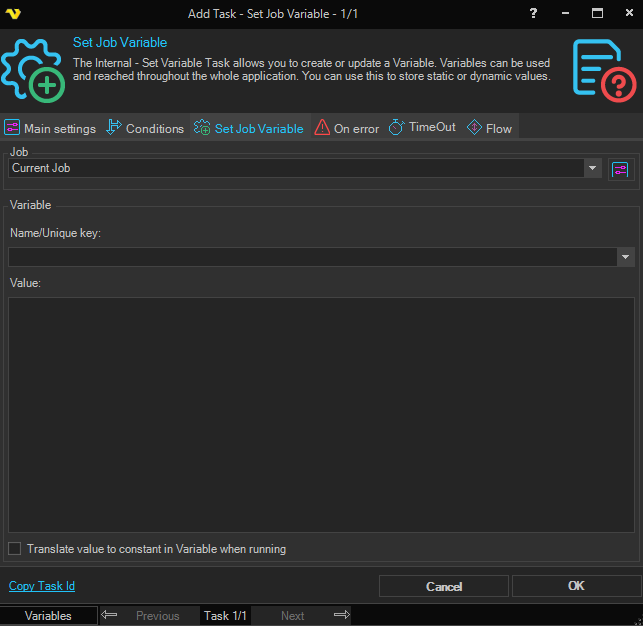
Job
Select the Job whose Variable to set. Defaults to the Job this Task belongs to; any Job can be selected. The icon next to the list opens the selected Job's Job Variables; for a Job that is already saved on the Server, changes made there are saved to that Job at once, even if you then cancel this Task.
Variable
Name/Unique key
Select one of the Job's keys, or type a new key to create it. Keys are case-sensitive, and the field is not checked when you save, so make sure it is not empty. Read the value with {JOB(Active|Variable|<key>)} in the same Job, or {JOB(<jobId>|Variable|<key>)} from another Job.
Value
Set the value of the Variable.
Translate value to constant in Variable when running
Cleared by default: the value is stored as written, including any Variables in it. When selected, the Variables are replaced each time the Task runs, and the result is stored.
Result
The output gives the key and its value. The Task fails if the Job does not exist. When a user starts the Job, from the Client or from another Job a user started, that user needs the Edit permission for Variables (set for the user's group, not per Job), or the Task fails (see User permissions). Runs started by a Trigger are not checked.
Whether a change is kept after the run depends on how the run started; see When changes are kept on the Job Variables page. In a run whose changes are set back, a key this Task adds to its own Job is removed when the run ends, so add the key in the Job's Job Variables window first.