Task Internal - Report
The Task Internal - Report Task creates a comprehensive report in a file or on a printer based on the execution statistics of Jobs and Tasks, settings and events of various Server Objects, performance metrics, log entries, and other relevant data sources.
Report > Output sub tab
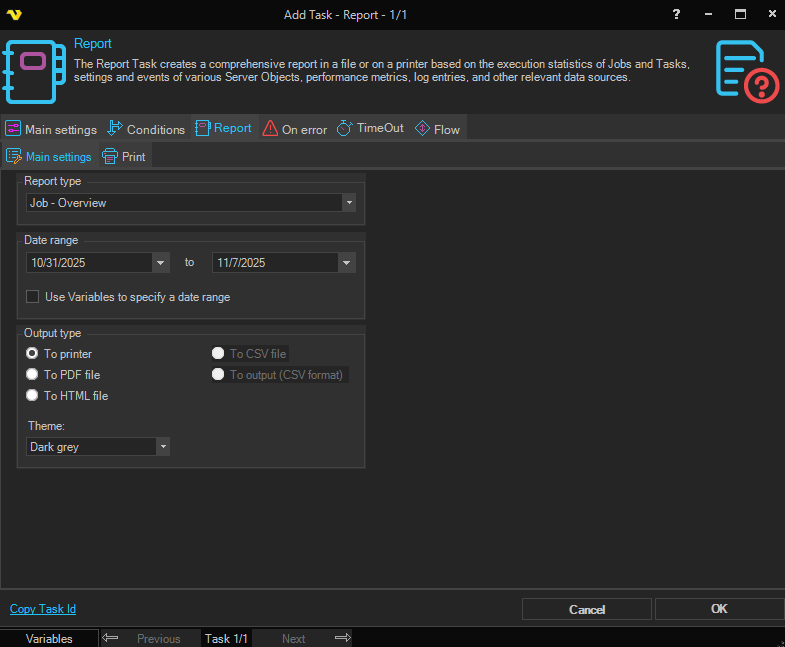
Report type
Select the report type from the dropdown.
Date range
Select the start and end dates for the report using the date pickers.
Use Variables to specify a date range
If checked, use Variables to specify the date range instead of date pickers.
Output type
To printer / To PDF file / To HTML file / To CSV file / To output (CSV format)
Select the output format for the report.
Theme
Select the visual theme to apply to the report.
Job range
All Jobs / Specific Job groups / Specific Jobs
Select whether to include all Jobs or narrow to specific Job groups or Jobs.
Internal > Report > Printer sub tab
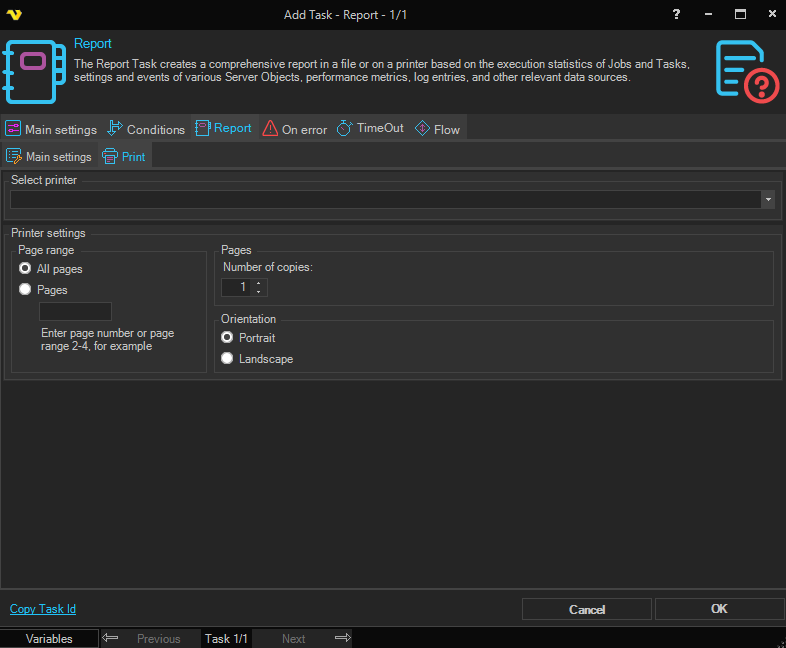
If output to printer is selected in the Report > Output sub tab, select printer settings.
Select printer
Select the printer from the dropdown.
Printer settings
Pages
Number of copies
Enter the number of copies to print.
Orientation
Portrait / Landscape
Select the page orientation.
Page range
All pages / Pages
Select whether to print all pages or enter a specific page range, for example 2-4.