Event Trigger - Folder
The Folder event trigger monitors changes to folders in a file system. The Trigger reacts on folders that have been created, changed, deleted or renamed. Use the File event trigger to monitor files instead.
To monitor a remote folder, select a Credential with access to that folder in the Main settings tab.
Triggers > Add > Event Trigger > Folder tab
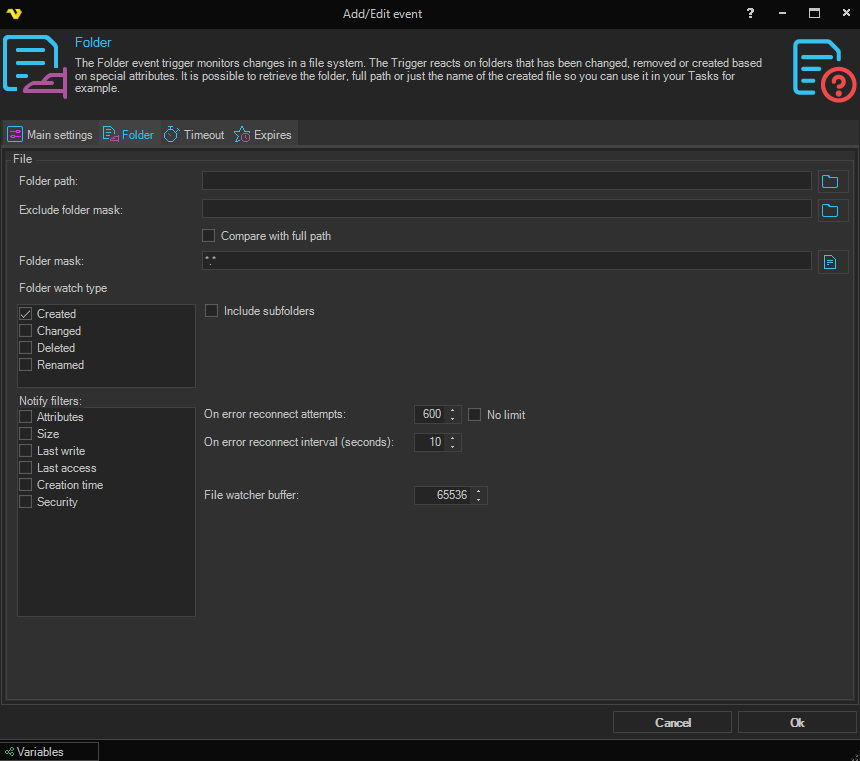
Folder path
This is the directory you want to monitor.
Exclude folder mask
Use this field, with or without wild cards, to exclude folders matching the mask from triggering. The comparison is done against the folder name. If you want to check against the whole path, check Compare with full path.
Compare with full path
See above.
Folder mask
The folder names to monitor. Use *.* to monitor all folders (default), or enter a complete folder name or a pattern with wild cards.
Folder watch type
Select the folder changes that fire the Trigger. At least one watch type must be selected:
- "Created" - the creation of a folder (default)
- "Changed" - a change to a folder. Which changes are detected is controlled by the Notify filters
- "Deleted" - the deletion of a folder
- "Renamed" - the renaming of a folder
Include subfolders
This setting enables monitoring of all sub folders of the Folder path.
Notify filters
Specifies which changes to a folder are watched for when the Changed watch type is selected. At least one notify filter must be selected when Changed is used. The following notify filters can be activated:
- "Attributes" - the attributes of the folder
- "Size" - the size of the folder
- "Last write" - the date the folder last was updated
- "Last access" - the date the folder was last opened
- "Creation time" - the creation time of the folder
- "Security" - the security settings of the folder
On error reconnect attempts
Let say the folder you watch gets disconnected for some reason, perhaps the network or computer is down. The reconnect attempts value controls how many times VisualCron tries to reconnect. Default value is 600 times.
No limit
When checked, VisualCron will keep retrying the connection indefinitely and the On error reconnect attempts field is disabled.
On error reconnect interval (seconds)
The number of seconds VisualCron waits between each reconnect attempt. Default is 10 seconds.
File watcher buffer
You can set the buffer to 4 KB or larger, but it must not exceed 64 KB. Default is 65536 (64 KB). Increasing the size of the buffer can prevent missing file system change events. However, increasing buffer size is expensive, so keep the buffer as small as possible.