Task Process - .NET Code Execute
The Process - .NET code execute Task is able to execute .NET code using languages C# or VB.NET.
You are able to use Variables wherever in the code and parameters. The output of the method is converted to string. The purposes of this Task could be many but you could use it to solve a specific problem for you (when no existing Task can do that for you).
The code is compiled in real time for each execution.
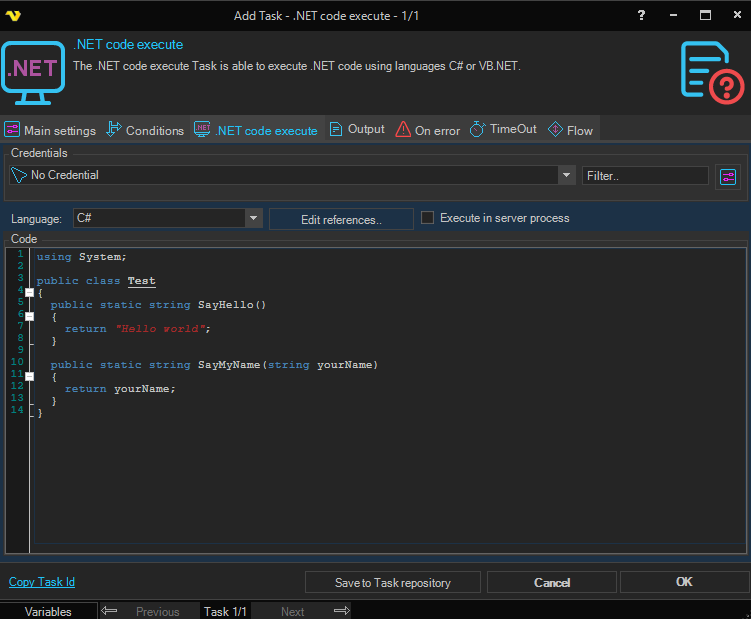
Credentials
When the code runs in a separate process (the default), it runs as the user of the selected Credential. Select a Credential in the combo box, or click the Settings icon to open Manage credentials and add or edit one. With No Credential, the Task runs as the account the VisualCron service runs under. This applies with Load user profile selected on the Credential (the default); without it, the Credential is used only for network access (see Local login and Load user profile).
Language
Select either C# or VB.NET language. The syntax editor and compile methods will alter depending on selected language.
Edit references..
Add or remove the DLLs your code references.
Execute in server process
When checked, executes the .NET code within the VisualCron server process instead of launching a separate external process. Should only be used for simple code without complex dependencies.
The code then runs inside the VisualCron Server. An error that ends the process or a call to Environment.Exit stops every Job on the Server, and an endless loop uses Server CPU until the Task times out.
Output format
Select how the method's return value is serialized:
- ToString representation of output — calls
.ToString()on the return value (default). Arrays are comma-separated. - XML representation of output — serializes the return value as XML.
This setting is on the Output tab.
Code
In this text box you insert your code. It is important that:
- The code exists in a class
- Its methods are static (Shared)
Any return value will be converted to a string. The code is compiled with the .NET Framework compiler, so syntax up to C# 5 and Visual Basic 11 is supported (for example, no string interpolation with $).
Method and parameters
Select the method you want to use. After you have added new code, click Refresh methods.
Compile
This button tests if the code can compile and will return a popup with error if not.
Refresh methods
Compiles the code and lists its public methods. Use static (Shared) methods; instance methods are listed but may fail when the Task runs.
Run
Compiles and runs the code so you can test it.
Run executes the code on the VisualCron Server, inside the Server process, as the selected Credential, even when Execute in server process is cleared. Anything the code does, such as writing files, really happens.
Parameters
Double-click a parameter row to set its value.
Troubleshooting
An error occured: Could not find a part of the path 'local path to tmp file'
Compile, Refresh methods and Run work in the temp folder of the account the VisualCron service runs under, on the VisualCron Server. Check that this folder exists and can be written to.